

 By
By 
Updated 2026: In this article, we explore how a ChatGPT SharePoint workflow can transform the way organizations handle tasks, automate routine processes, and improve collaboration. By integrating ChatGPT with SharePoint and Power Automate, you can streamline workflows, enhance productivity, and gain intelligent insights from your data—all without manual intervention.
What Is ChatGPT and Its Role in SharePoint Workflow?
An AI-driven language model called ChatGPT was created by OpenAI. “ChatGPT” stands for “Chat Generative Pre-trained Transformer.” It generates human-like replies to natural language cues using deep learning algorithms. ChatGPT can comprehend and produce answers to a wide range of subjects and inquiries since it has been trained on a vast quantity of text data. It is a potent tool for a range of applications, including chatbots, customer service, content production, and more.
Why ChatGPT SharePoint Workflow Is Important
Are you tired of using the same old SharePoint UI and constantly running into issues with process simplification and improving team communication? Look no further than ChatGPT, the OpenAI-powered language model, to change your SharePoint experience.
In this article, we’ll examine the top 5 ways ChatGPT may change your SharePoint workflow, including automating repetitive processes, optimizing project management, strengthening communication and collaboration, analyzing data for improved decision-making, and enhancing security and compliance. So let’s get started and discover how ChatGPT can up your SharePoint game.
How ChatGPT SharePoint Workflow Can Improve Your Processes
In many ways, we can boost SharePoint productivity with the help of ChatGPT. In this section, we will learn the top 5 ways that ChatGPT can improve your SharePoint workflow:
Automating Routine Tasks with ChatGPT SharePoint Workflow
Natural language processing tools from ChatGPT can be used to handle many of the time-consuming, repetitive tasks that frequently cause SharePoint output to suffer. The generation and dissemination of reports, the creation of new files and documents, as well as other managerial tasks that would otherwise require time and resources, can all be automated with ChatGPT, for example.
Improving Communication and Collaboration with ChatGPT SharePoint Workflow
Regardless of a team member’s location or time zone, ChatGPT may aid in improved communication and cooperation. You may send messages, share files, and collaborate on projects in real-time using ChatGPT. Moreover, you can utilize ChatGPT to set up automatic notifications and alerts to keep everyone informed and guarantee that important tasks are finished on schedule.
Enhancing Project Management with ChatGPT SharePoint Workflow
Also, ChatGPT can assist in streamlining the SharePoint project management procedure. Task creation and assignment, deadline and reminder setting, and real-time progress monitoring are all possible with ChatGPT. In addition, ChatGPT may assist with job identification and prioritization, automated scheduling, and resource allocation optimization.
Analyzing SharePoint Data with ChatGPT SharePoint Workflow for Better Decisions
By utilizing ChatGPT, you can use artificial intelligence to analyze and display your SharePoint data and produce insights that can help you make decisions. You may use ChatGPT to generate predictions based on previous data, spot anomalies and outliers, and spot trends and patterns. You may make better informed judgements and take action with greater assurance with ChatGPT’s data analysis capabilities.
Boosting Security and Compliance with ChatGPT SharePoint Workflow
Your SharePoint environment’s security and compliance may be enhanced with the aid of ChatGPT. Your SharePoint system may be monitored by ChatGPT for potential security holes or regulatory infractions, and you will be informed in real time. Moreover, ChatGPT can be used to create compliance reports, automate security audits, and make sure your SharePoint system is kept up to date with the most recent security patches and upgrades.
You can alter your SharePoint workflow and enhance productivity, efficiency, and cooperation throughout your business by utilizing ChatGPT’s powerful features. ChatGPT provides the tools and skills to help you reach your goals, whether you’re wanting to automate repetitive operations, improve project management, or increase communication and collaboration.
Create a ChatGPT SharePoint Workflow Using Power Automate
Using ChatGPT AI, we can create Power Automate as well, but this product is now in preview mode (February 2023), where we just need to explain the need for the flow, and then automatically, AI will create the flow for you. Let’s get started. How does this work?
Describe It to Design It in Power Automate for ChatGPT SharePoint Workflow
Login to your Power Automate environment using this URL: https://make.powerautomate.com/
Click on the “New Flow” drop-down selection.

At the bottom, we can see the new flow creation option, “Describe it to design it (preview)”. This is the ChatGPT AI-based flow creation method Microsoft has introduced; now (February 2023), this feature is in preview mode, and Microsoft is working on it.
Notes:
- As of today (February 2023), the environment must be in the United States or Europe region; otherwise, the above AI-based flow creation feature will not be shown. It will be available in all regions of the environment in the future.
- If you don’t have an environment with the USA or Europe region, you can create a new one to play around with this feature; refer to this article on how to create a new environment in Power Platform.
Demo: Create a ChatGPT SharePoint Workflow Using Power Automate
Creating flow using the ChatGPT AI is a three-step process.
Describe it to design it (preview):
First, we need to select the flow creation option as “Describe it to design it (preview)”.
The flow creation parameters will then be obtained.

Here, we can either describe the flow for what purpose we are creating it—what will this flow do?Or, we can select from the predefined template or example (there are lots of templates and examples).
I have chosen the first option, where I just typed “When a new item is created in SharePoint, send me an email,” and then got the below suggested flow trigger.

Note:
- While typing the description of the flow, we will get to see automatic suggestions as well, like in Google search.
Click on the “Next” button.
Review your connected apps and services:
Then, we will see the “Review your connected apps and services” screen.

Click on the “Next” button.
Finalize the flow (optional):
In this configuration, we need to pass the site URL, list name, and other parameters. These configurations are optional, as we can configure them after creating the flow as well.
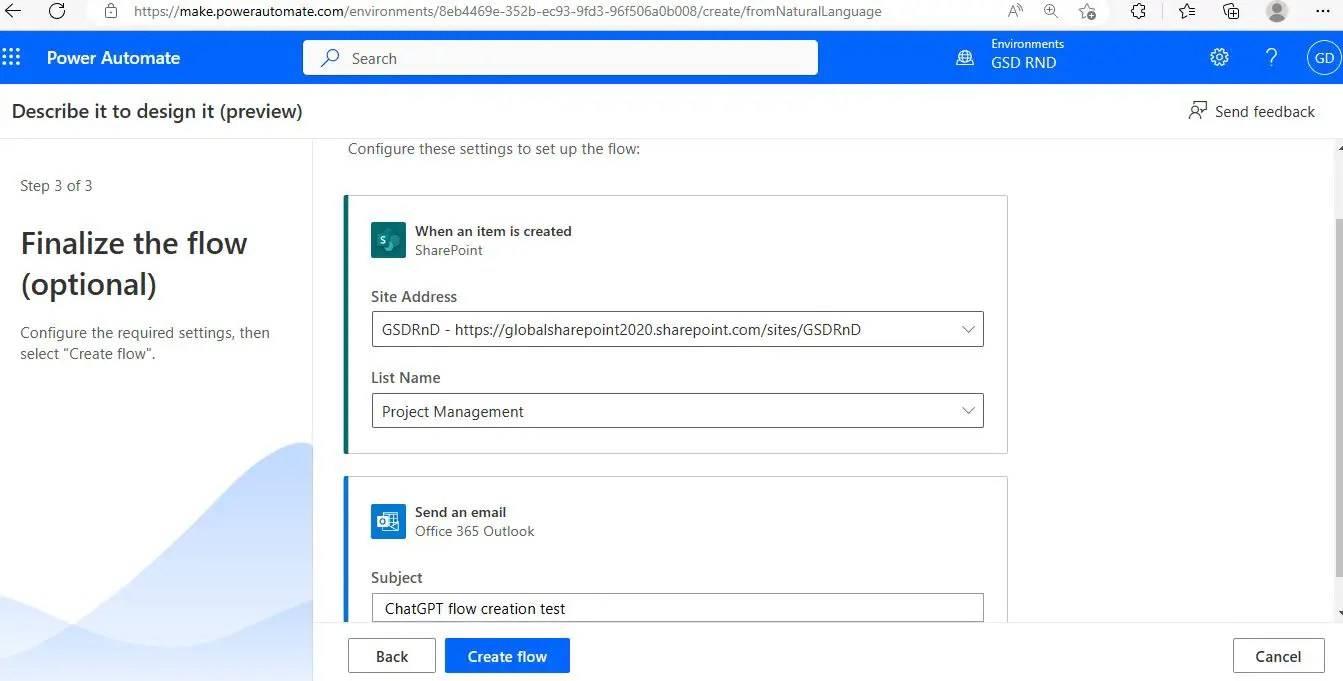
Finally, click the “Create flow” button, and your flow will be created successfully, as shown below:
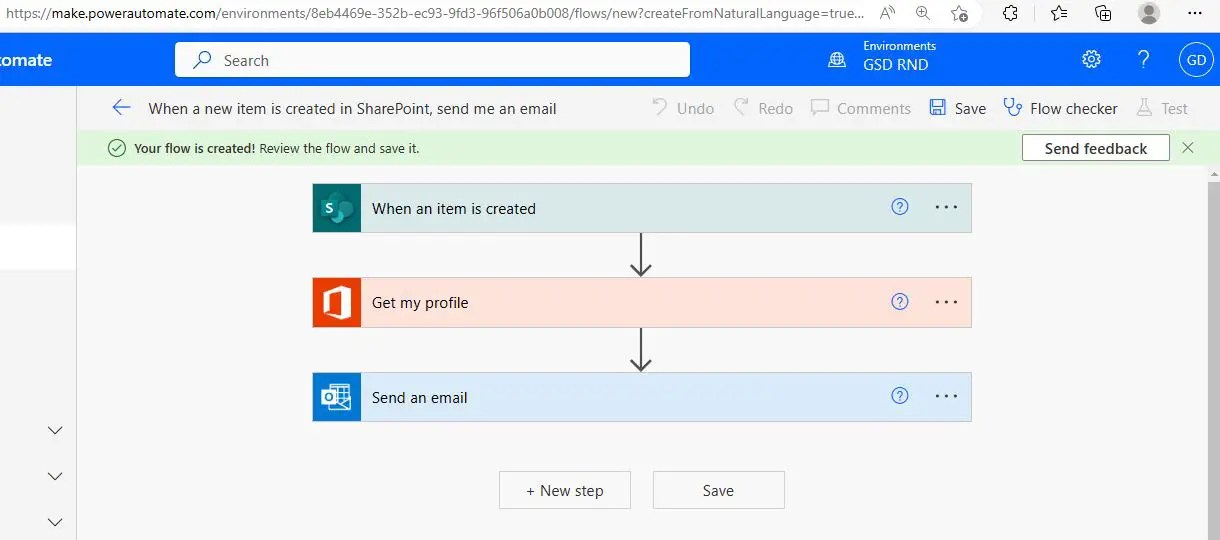
Create Power Automate flow using ChatGPT AI demo
We used a sample use case in the above demo, but we can create any complex flow using the ChatGPT AI, so we can say that ChatGPT is not a job killer, but rather a useful tool for your work that will increase your productivity.
Top 17+ ChatGPT Alternatives in 2026: Boost Your AI Workflow
While ChatGPT is a powerful AI tool for content generation and workflow automation, several other AI-based platforms in 2026 can help you achieve similar results. Here’s a curated list of the top 17+ ChatGPT alternatives for content creation, automation, and productivity:
- Paraphrasingtool.ai – AI-powered tool to rewrite articles, blogs, and newsletters in minutes for faster content creation.
- Google Gemini (formerly Bard) – Google’s generative AI assistant for text, workflow automation, and productivity.
- Microsoft Bing AI – AI assistant integrated with Bing search and Microsoft apps for content creation and automation.
- QuillBot – AI writing assistant to paraphrase, summarize, and improve content while automating repetitive tasks.
- DialoGPT – Conversational AI model designed for chat automation and generating human-like responses.
- Chatsonic – AI chatbot that supports content creation, task automation, and real-time workflow assistance.
- OpenAI Playground – Platform to experiment with OpenAI models for AI-driven content and workflow solutions.
- YouChat – AI chat assistant that helps automate content tasks, provide insights, and enhance workflow efficiency.
- Jasper Chat – AI tool for blogs, marketing content, and automating repetitive content creation workflows.
- Character.AI – Conversational AI platform with creative personalities for interactive workflow assistance.
- Perplexity AI – AI assistant for analyzing, summarizing, and generating insights from content.
- Socratic by Google – AI-driven learning assistant that simplifies information discovery and workflow-based knowledge management.
- Peppertype.ai – AI content generation platform for blogs, social media, and marketing automation.
- Replika – AI chatbot for personal conversation and automating routine communication tasks.
- Rytr – AI writing assistant for blogs, emails, and social media posts to boost productivity.
- Bloom – Open-source AI text generation model for content creation and workflow automation.
- Writesonic – AI platform for generating marketing copy, articles, and automating business communication.
Optional Bonus AI Tools:
- Claude by Anthropic – ChatGPT competitor for AI-powered workflow and content tasks.
- Microsoft 365 Copilot – AI assistant integrated into Office apps for productivity and workflow automation.
Summary: ChatGPT SharePoint Workflow Key Takeaways
We look at five various ways that ChatGPT, a language model driven by AI, may enhance your SharePoint process in this blog article. Secondly, ChatGPT can automate repetitive operations like producing reports and new papers, which may decrease mistakes and save time.
Second, by offering real-time chat, file sharing, and alerts, it may improve cooperation and communication by keeping everyone in the loop.
Finally, by generating and assigning tasks, establishing deadlines, and monitoring development in real-time, ChatGPT may enhance project management. Fourthly, by spotting trends and patterns, spotting anomalies, and generating predictions based on past data, it may aid in data analysis.
As a last measure, it may enhance security and compliance by keeping an eye on SharePoint for potential security flaws and compliance violations and generating automatic security audits and compliance reports. Organizations may enhance their SharePoint workflow, productivity, efficiency, and collaboration by utilizing ChatGPT’s features.
FAQs: ChatGPT SharePoint Workflow
In this section, we answer the most popular questions about ChatGPT SharePoint workflow and how it improves productivity and automation.
Q1: Can ChatGPT increase SharePoint productivity?
Yes! A ChatGPT SharePoint workflow can automate repetitive tasks, like organizing documents and generating reports. It enables real-time collaboration, improves communication among team members, and helps manage projects efficiently by tracking tasks and deadlines.
By analyzing SharePoint data, ChatGPT empowers users to make smarter, data-driven decisions, reduces errors, and enhances overall productivity.
Q2: Will ChatGPT affect the SharePoint job market?
There’s no simple yes or no. While ChatGPT can automate certain repetitive tasks, the demand for skilled SharePoint professionals remains strong. Employers still need developers, consultants, and architects who understand SharePoint workflows and cloud-based solutions.
Staying updated with AI tools like ChatGPT can actually enhance a professional’s value by combining technical expertise with automation skills.
Overall, the employment market for SharePoint experts is anticipated to be healthy, but to stay competitive, professionals must stay up to date on market trends and advancements.
Q3: How can we use ChatGPT in SharePoint Online?
There are multiple ways to integrate ChatGPT with SharePoint Online:
- Add a ChatGPT-powered chatbot to your SharePoint site using Microsoft Power Virtual Agents.
- Use ChatGPT for content recommendations, analyzing SharePoint content to suggest personalized items to users.
- Enhance document search with natural language queries powered by ChatGPT.
- Automate workflows by integrating ChatGPT with Power Automate for tasks like file management, approvals, and notifications.
Q4: How can ChatGPT help SharePoint users manage content better?
ChatGPT SharePoint workflow can assist with:
- Content Discovery: Finds relevant content based on user queries.
- Content Recommendations: Suggests personalized content to increase engagement.
- Content Classification: Automatically tags and organizes documents for easier search.
- Content Creation & Translation: Helps generate summaries, titles, and translations efficiently.
Q5: Can ChatGPT upload files to SharePoint Online?
ChatGPT cannot upload files directly. However, you can build a custom ChatGPT-powered workflow with Power Automate or a chatbot using Microsoft Power Virtual Agents to:
- Collect file information (name, description, location)
- Use SharePoint API or Microsoft Graph API to upload files
- Notify users upon successful upload
Q6: How can ChatGPT process document metadata in SharePoint Online?
Using natural language processing (NLP), ChatGPT can:
- Extract metadata (title, author, date, keywords) automatically
- Improve search with natural language queries
- Tag documents intelligently based on content
- Validate metadata to maintain consistency and accuracy
See Also: Chatbot in Power Apps (ChatGPT Tutorials)
You may also be interested in these ChatGPT and Power Platform articles:
- ChatGPT or Google Bard: Which AI Language Model Wins?
- ChatGPT and Power Automate: Boost Your Power Automate Productivity with ChatGPT Integration
- 50 Tricky Power Automate Interview Questions and How to Answer Them
- Top 50 Tricky Power Apps interview questions and answers for experienced – Part 2
- Top 50+ Power Apps interview questions and answers for experienced – Part 1
- Quickly create your own chatbot in PowerApps step by step
- Microsoft SharePoint Syntex: How to enable SharePoint Syntex in Microsoft 365 tenant?
- SharePoint Syntex: Overview of SharePoint Syntex in Microsoft 365
About Post Author
