

 By
By 
In this “Power Automate Contains Function” article, we will learn about how to work with the contains function in Power Automate flow with real-time project-based examples.
Microsoft Power Automate is a robust tool for automating workflows, enabling organizations to streamline and optimize various tasks. One of its versatile functions is the “contains” function, which allows users to check if a given string contains a specific substring. In this article, we will explore the Power Automate contains function and provide a real-time example to illustrate its practical application.
Power Automate Contains Function with Real-Time Example
Before getting into the article, let’s understand what contains a function in Power Automate.
What is Contains Function in Power Automate?
In simple terms, the contains function checks whether a collection has a specific item, and it returns true when the item is found or false when it is not found. This function is case-sensitive.
The contains function in Power Automate is a valuable feature that enables you to check whether a specified string contains a particular substring. It is particularly useful when dealing with text manipulation within your workflows. This function returns a Boolean value, indicating whether the substring is found within the given text.
The syntax of the contains function is straightforward:
contains('<collection>', '<value>')
contains([<collection>], '<value>')
Parameters:
- <collection>_Required: The data types are String, Array, or Dictionary. The collection to check
- <value>_Required: The data types are String, Array, or Dictionary, respectively. The item to find
Notes:
- A string to find a substring
- An array to find a value
- A dictionary to find a key
Example: Find a product in the product array
Let’s say we have the below items in the product array variable.
[
"Desktop",
"Headphone",
"Laptop",
"Monitor",
"Mouse"
]
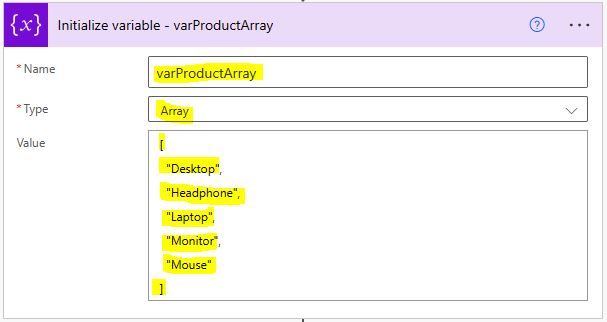
Now, let’s check whether the ‘Laptop’ product is available in this production array. To check that, we need to use the below expression:
contains(variables('varProductArray'), 'Laptop')

Find a product from the product arrayNote:
- Here in this demo, we have used the compose action.
Output:
Once we run this flow, we can see the output as ‘true” as this product ‘Laptop’ is available in the product array.

Example: Check a substring in the string
To check whether a substring text exists in the given string, we can use the below expression:
contains('Power Automate', 'Automate')
Output:
- true because the word ‘Automate’ is found in the string ‘Power Automate’.
Example: Checking if a Name Contains a Specific Character
To find a name that contains a specific character, we can use the below contains function:
contains('John Doe', 'D')
Output:
- true because the letter ‘D’ is found in the name ‘John Doe’.
Example: Checking for Substring in a Longer Text
To check for a substring in a longer text, we can use the below expression:
contains('The quick brown fox', 'quick')
Output:
- true because the substring ‘quick‘ is found within the text ‘The quick brown fox’.
Example: Checking for the Absence of a Substring
To check for the absence of a substring in a string, we can use the below contains function:
contains('This is a sample text', 'missing')
Output:
- false because the substring ‘missing‘ is not found within the text.
Example: Using Contains in a Condition to Trigger an Action
In a real-time scenario, you can use the contains function in a condition to trigger a specific action. For instance, if you’re monitoring social media mentions, you can check if a post contains a certain keyword and then take an action accordingly. The condition would look like:
contains(triggerOutputs()?['body'], 'important_keyword')
Output:
- If the keyword is found in the social media post, the condition is true, and you can take actions like sending a notification or saving the post to a database. If the keyword is not found, the condition is false.
Example: Checking for Partial Matches in a List
You can use contains in combination with other functions to check if a value exists in a list of values.
Suppose you have a list of fruit names, and you want to check if a specific fruit is in the list.
contains('apple, banana, orange, grape', 'banana')
Output:
- true because ‘banana’ is one of the items in the comma-separated list.
Summary: Power Automate Contains Function (Power Automate Functions)
Thus, in this article, we have learned about the Power Automate Contains function with a couple real-time examples considering real-time project scenarios.
See Also: Power Platform Articles
You may also visit the Power Platform article hub, where you will see a bunch of articles focusing on Power Platform, like Power Automate, Power Apps, etc. All the articles are written with real-time project scenarios and troubleshooting techniques. For the Power Automate function references, you may refer to this Microsoft Power Automate Function references article.
About Post Author

Discover more from Global SharePoint
Subscribe to get the latest posts sent to your email.