

 By
By 
Introduction
The history of SharePoint traces a 25‑year journey from on‑premises document management in 2001 to today’s AI‑powered, cloud‑first collaboration platform in Microsoft 365. This 2026 update covers major releases, the shift to SharePoint Online, and the newest Copilot‑driven experiences, with verified timelines and support milestones.
History of SharePoint: Early Years (2001–2007)
SharePoint 2001 – Portal & Indexing
Microsoft launched SharePoint Portal Server 2001 for enterprise document storage and search, establishing the platform’s roots in content management and indexing.
SharePoint 2003 – WSS 2.0 & Team Sites
With Windows SharePoint Services (WSS) 2.0, SharePoint 2003 introduced team sites, lists, and document libraries—ushering in structured collaboration integrated with Office 2003.
Key features in SharePoint 2003:
- Microsoft releases version 2.0 products
- Windows SharePoint Services – WSS (SQL and . NET)
- Office SharePoint Portal Server 2003 (built on top of WSS)
SharePoint 2007 (MOSS) – ECM & BI Arrive
MOSS 2007 expanded into enterprise content management, improved search, and added dashboards/business intelligence—cementing SharePoint as a strategic enterprise platform.
Key features in SharePoint 2007:
- Fixes many shortcomings of the 2003 product, and introduces new features such as Business Data Catalog and InfoPath Form Services
- Introduction to Windows SharePoint Services – WSS
- Introduction to Microsoft Office SharePoint Server 2007 – MOSS
- Introduction of Excel Services
- Introduction of Content types
- Introduction of SharePoint Designer (Post FrontPage era begins)
Evolution of SharePoint: Modernization (2010–2019)
SharePoint 2010 – Social + Browser Editing
SharePoint Server 2010 delivered My Sites, blogs/wikis/tags, plus Office Web Apps for in‑browser editing—significant usability and collaboration gains.
Key features in SharePoint 2010:
- Microsoft SharePoint Server 2010
- Improvements in InfoPath, workflows, business data services, excel services, management metadata, etc.
- Introduction of the “Ribbon”
- Early social networking features
- Overhaul of the Shared Service Providers in favour of Service Applications and the ability to pool them
- Sandboxed solutions and client access to the API
- PowerShell support
- Two way BCS
SharePoint 2013 – Cloud Momentum & App Model
SharePoint Online entered the mainstream while 2013 added the App Model, better enterprise search, and early OneDrive for Business (SkyDrive Pro), foreshadowing the cloud era.
Key features in SharePoint 2013:
- SharePoint 2013 On-Premise
- Introduction to Office 365 / SharePoint Online
- Office 365 SharePoint Online came to the market in February 2013.
- Cross-Browser Support
- Drag/drop Uploads
- More social features
- OneDrive integration as a replacement for MySites
- Addition of the audit center
- Re-engineered search facilities
SharePoint 2016 – Hybrid
SharePoint 2016 emphasized hybrid search and stronger Office 365 connections, creating a bridge between on‑prem farms and Microsoft’s cloud services.
Key features in SharePoint 2016:
- SharePoint 2016 On-Premise
- Microsoft released SharePoint 2016 in May of 2016 and feature pack 2.
- SharePoint 2016 supports modern interfaces in OneDrive sites only.
- Office 365 Groups with SharePoint Online sites
- Introduction to MinRoles
- Improved patching zero downtime
- Content database size increased from 200 GB to 1TB.
- Maximum file storage from 2GB to 10GB.
- Other than port 25, non-default ports also can be used for connection encryption.
- Faster site creation using the new PowerShell command and UI
- Hybrid mode example – search, content type, manage metadata group, etc.
SharePoint 2019 – Modern UX On‑Prem
SharePoint Server 2019 brought modern pages, lists/libraries, and communication sites to on‑premises customers who needed the latest UX without moving entirely to the cloud.
2019 SharePoint Online – Office 365/Microsoft 365:
- Risky IP for Active Directory Federation Services (ADFS) extranet lockout protection.
- Azure Information Protection analytics (preview).
- SharePoint sites: updated “Change the look” panel.
- SharePoint Admin Center Experience Updates – default to modern experience.
- Mobile admin app update, including device management.
- Admin center support updates, including full-page ticket history view and callback scheduling.
- MyAnalytics add-in coming to more Microsoft 365 and Office 365 suites.
- Signals: We’re adding visual cues about the status of a file, such as check-outs, sharing, DLP blocks, or missing metadata to modern views.
- Sticky column headers: For large lists and libraries, the column headers will remain visible as you scroll vertically or horizontally in larger lists and libraries.
- Easy page and news publishing experience from the site pages library.
- Column totals: Users will be able to display column totals and subtotals in the footer of a group or a list/library view in the modern SharePoint experience without needing to change to classic mode.
Key features in SharePoint 2019 On-premise:
The key improvements of this version are as below:
- Trying to maintain the look and feel as same as SharePoint online.
- Introduction of the modern interface.
- Responsive UI.
- Without the hybrid configuration trying to have Power Automate (formerly known as Microsoft Flow) and Power Apps.
- Team Site Improvements
- Modern User Experience Improvements
- Communication Site Improvements
- Improved Support for Business Processes
SharePoint Timeline: Evergreen Cloud (SharePoint Online)
2016–2024 — Continuous Cloud Enhancements
SharePoint Online evolved continuously with modern sites, richer web parts, Teams integration, and mobile‑ready experiences—shipped on Microsoft’s standard cloud cadence.
2020: SharePoint Online – Office 365/Microsoft 365:
- Announcing the general availability of Communication Compliance
- Adding Campaign Views to Office 365 ATP
- Outlook for iOS: S/MIME automated certificate delivery
- Advanced eDiscovery dashboard
- Microsoft Teams – App catalog
2025–2026 — AI & Copilot Era
The platform enters “agentic AI”: SharePoint Agents surface site knowledge in chat, an AI‑curated FAQ web part emerges, file‑level Microsoft 365 Archive arrives (July 2026), and Just‑In‑Time protection extends governance to on‑share events (Nov 2026).
SharePoint 2026 Updates: UX, Governance, and Roadmap
25th‑Anniversary UX “Glow‑Up” (March 2026)
Microsoft introduced a refreshed SharePoint canvas (rounded styling), a redesigned App Bar (Discover replaces My News; Create splits into Publish and Build), OneDrive integrated in place of “My Files,” and the Viva Connections app in Teams evolving into the SharePoint app—a clearer navigation and authoring experience across the digital workplace.
Lifecycle & Retirements You Must Know (2026)
- End of Support (on‑prem): SharePoint Server 2016 and 2019 reach end of support on July 14, 2026.
- Office Online Server retires December 31, 2026.
- SharePoint Add‑ins and SharePoint 2013 Workflows retire April 2, 2026 (SharePoint Online).
Server Subscription Edition (SE) Keeps On‑Prem Evergreen
SharePoint Server Subscription Edition receives consolidated monthly updates (security + features), with current update history showing ongoing January and February 2026 releases—Microsoft’s evergreen model for customers who remain on‑premises.
Developers: SPFx & Customization in 2026
SPFx Roadmap
SharePoint Framework (SPFx) remains the primary customization model. 2026 updates (e.g., 1.23/1.24) focus on navigation customizers and improved list Command Set experiences—aligning custom UI with modern navigation.
Key Takeaway: History of SharePoint
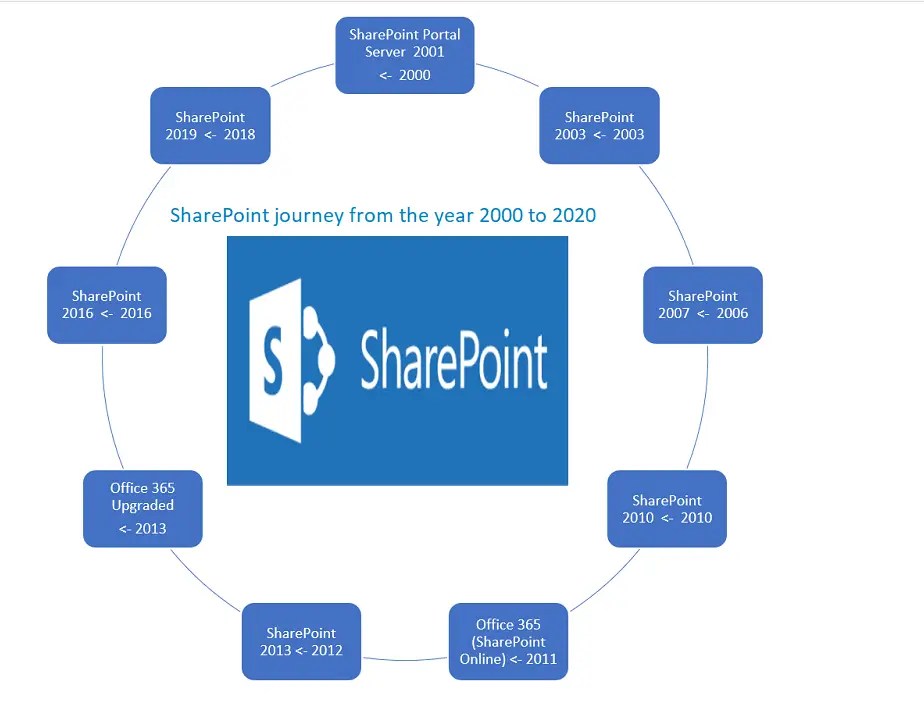
- SharePoint Portal Server 2001 – First major release introducing enterprise document management and search.
- SharePoint 2003 (WSS 2.0 + SPS 2003) – Enhanced team sites, document libraries, and Office 2003 integration.
- SharePoint 2007 (MOSS 2007) – Introduced enterprise content management, BI dashboards, and improved search.
- SharePoint 2010 – Added social features, Office Web Apps, and stronger enterprise search capabilities.
- Office 365 (2011) – Launched with SharePoint Online based on the SharePoint 2010 experience.
- SharePoint 2013 – Cloud‑aligned platform with improved search, App Model, and SkyDrive Pro (early OneDrive for Business).
- Office 365 Upgrade (2013) – Updated SharePoint Online to the new 2013 architecture and capabilities.
- SharePoint 2016 – Released in March 2016 with hybrid search and enhanced Office 365 integration.
- SharePoint 2019 – Released on October 22, 2018 with modern sites, pages, lists, and libraries for on‑premises deployments.
- Office 365 rebranded as Microsoft 365 – Microsoft repositioned Office 365 under the broader Microsoft 365 suite offering.
Latest Update: What’s new in SharePoint Online in 2024?
In 2024, SharePoint Online has introduced several new features and improvements aimed at enhancing user experience and productivity. Here are some of the key updates:
-
Copilot in SharePoint: This feature leverages AI to help users create and edit SharePoint sites and pages more efficiently. Users can give prompts to Copilot, which will then generate a starter site or page using information from across the organization. It can also assist in rewriting text to better engage readers and ensure the content aligns with branding guidelines (Microsoft) (ShareGate).
-
New Visual Design Elements: SharePoint now offers more sophisticated design elements, including advanced theming, typography, layout options, and video integration. The new Brand Center allows users to specify and reuse fonts, colors, logos, and other design elements across multiple sites, ensuring brand consistency.
-
Enhanced Video Capabilities: The Microsoft Stream web part has been updated to display single and multiple videos on SharePoint pages, supporting folders and playlists. Additionally, new video page templates make it easier to publish professional video content, whether starting from SharePoint or Microsoft Stream.
-
Improved Integration with Microsoft 365 Apps: SharePoint content can now be more seamlessly integrated with other Microsoft 365 apps, such as Outlook and Teams. This integration includes features like auto-creating Microsoft Loop workspaces to share meeting content and making SharePoint news posts email-ready by default.
-
Graph API for SharePoint Pages: The Graph API for SharePoint pages is now generally available, allowing developers to programmatically interact with SharePoint pages and news posts. This includes capabilities like creating, editing, and deleting pages, which enhances the flexibility and extensibility of SharePoint .
These updates reflect SharePoint’s ongoing commitment to improving usability, design flexibility, and integration within the Microsoft 365 ecosystem, making it easier for organizations to create engaging digital experiences.
Summary: History of SharePoint
The history of SharePoint reflects its transformation from an early 2001 document management system into today’s cloud‑first, AI‑powered collaboration and knowledge platform. Over the years, Microsoft has released multiple on‑premises versions—SharePoint 2001, 2003, 2007, 2010, 2013, 2016, and 2019—each introducing new capabilities in content management, search, workflows, and user experience. SharePoint Online, launched through Office 365 in 2011, further expanded the platform with continuous cloud updates and modern features.
By 2026, SharePoint has evolved even further with Copilot‑powered agents, a modernized UX, intelligent content discovery, and key lifecycle milestones—such as end‑of‑support timelines for legacy on‑premises versions—helping organizations plan for the future. Whether using SharePoint Server Subscription Edition or standardizing on SharePoint Online in Microsoft 365, the platform remains a cornerstone of enterprise
References for the History of SharePoint
See Also: SharePoint Online Tutorials
You may also find the following SharePoint Online tutorials helpful:
- Office 365: Getting started with SharePoint PnP PowerShell – installation
- In 2 steps convert a classic SharePoint page to modern using PnP
- Office 365: Retrieve hub sites and associated sites using PnP Powershell
- Create a modern team site using PnP PowerShell in SharePoint
- In 4 steps access SharePoint online data using postman tool
- SharePoint admin center: Learn SharePoint online administration in an hour – step by step
- SharePoint REST API: GET vs POST vs PUT vs DELETE vs PATCH
- Office 365: Understanding the hub site in SharePoint online
- Create SharePoint online list using PnP provisioning template
- List Template IDs In SharePoint Online/SharePoint 2019/2016/2013/2010/2007
About Post Author

Discover more from Global SharePoint
Subscribe to get the latest posts sent to your email.