

 By
By 
In this SharePoint Framework header footer article, we will learn about how to add a custom header and footer message to the SharePoint Online site page using the SharePoint Framework (SPFx) extension application customizer.
Key-Highlights: SharePoint Framework header footer
- Using SPFx add a custom header and footer message on the SharePoint Online Page
- Create an extension project step-by-step process – scaffolding process
- How to modify the alias name in the manifest.json file?
- Steps to implement Application Customizer – Header and Footer
- HeaderAndFooterAppExtensionApplicationCustomizer.ts file content
- Implementation of the OnInit() method
- Implementation of the _renderPlaceHolders() method
- Apply custom CSS for Header and Footer in SPFx
- Demo – verify the custom header and footer application extension from SharePoint Online page
- Download Source Code
- When should we use the extension type solution in the SPFx Framework?
- Summary
Create an extension project step-by-step process – scaffolding process (SharePoint Framework header footer)
-
Create a new project directory (folder) in your specified location using the below command:
C:\Temp\SPFx\Application Extension>md HeaderAndFooter_App_Extension
2. Go to the project directory using the below command
cd HeaderAndFooter_App_Extension

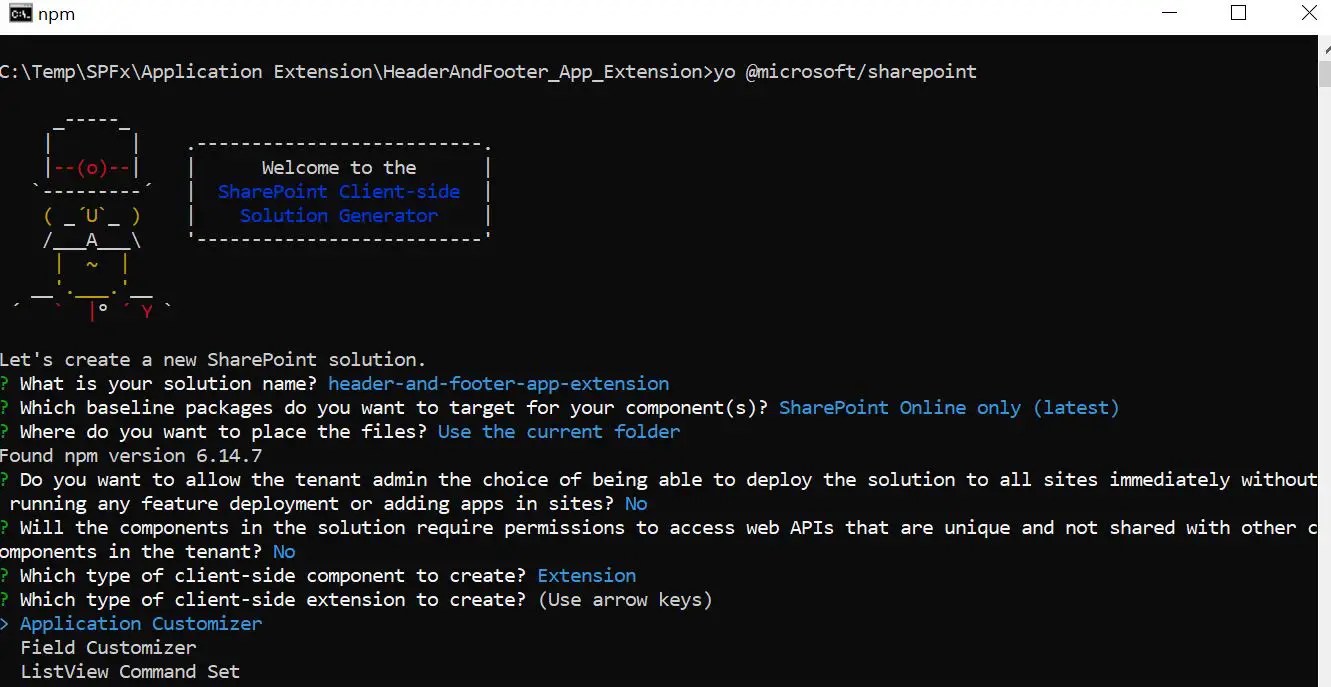
3. Run the yo @microsoft/sharepoint command to generate the extension project.
C:\Temp\SPFx\Application Extension>HeaderAndFooter_App_Extension>yo @microsoft/sharepoint
4. Pass the input parameters as prompts:
Let's create a new SharePoint solution.
? What is your solution name? header-and-footer-app-extension
? Which baseline packages do you want to target for your component(s)? SharePoint Online only (latest)
? Where do you want to place the files? Use the current folder
Found npm version 6.14.7
? Do you want to allow the tenant admin the choice of being able to deploy the solution to all sites immediately without
running any feature deployment or adding apps in sites? No
? Will the components in the solution require permissions to access web APIs that are unique and not shared with other c
omponents in the tenant? No
? Which type of client-side component to create? Extension
? Which type of client-side extension to create? Application Customizer
Add new Application Customizer to solution header-and-footer-app-extension.
? What is your Application Customizer name? Header-and-footer-app-extension
? What is your Application Customizer description? (Header-and-footer-app-extension description)
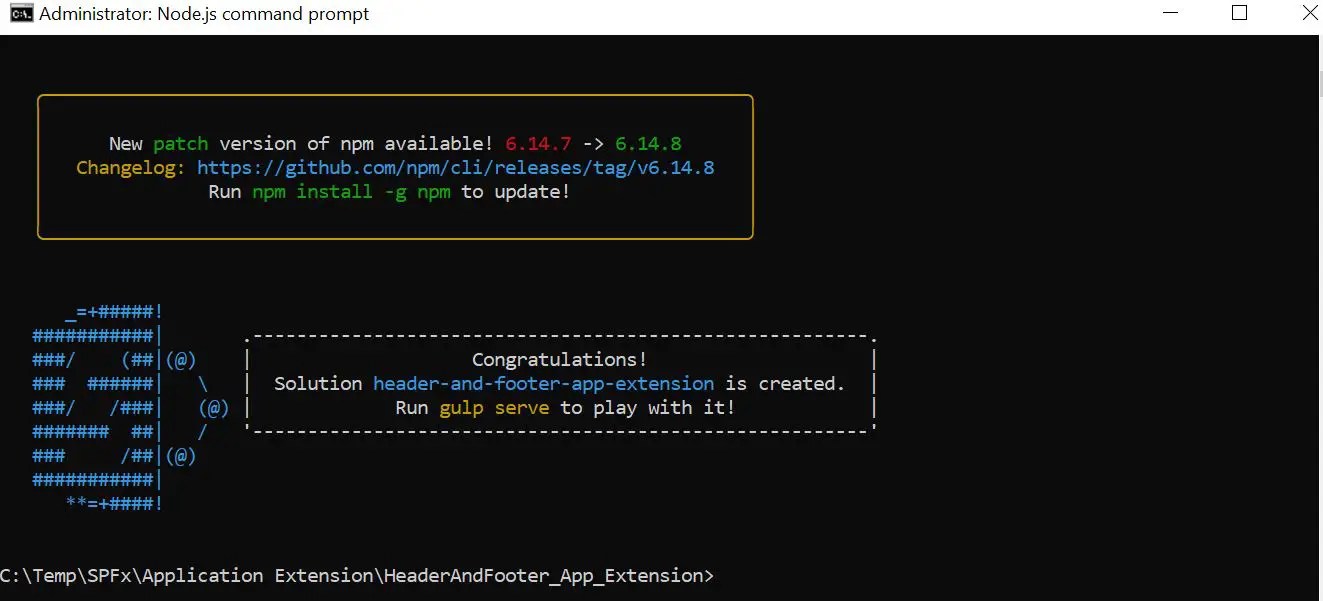
After some time, we can see that the SPFx application extension project – scaffolding is completed.
Note:
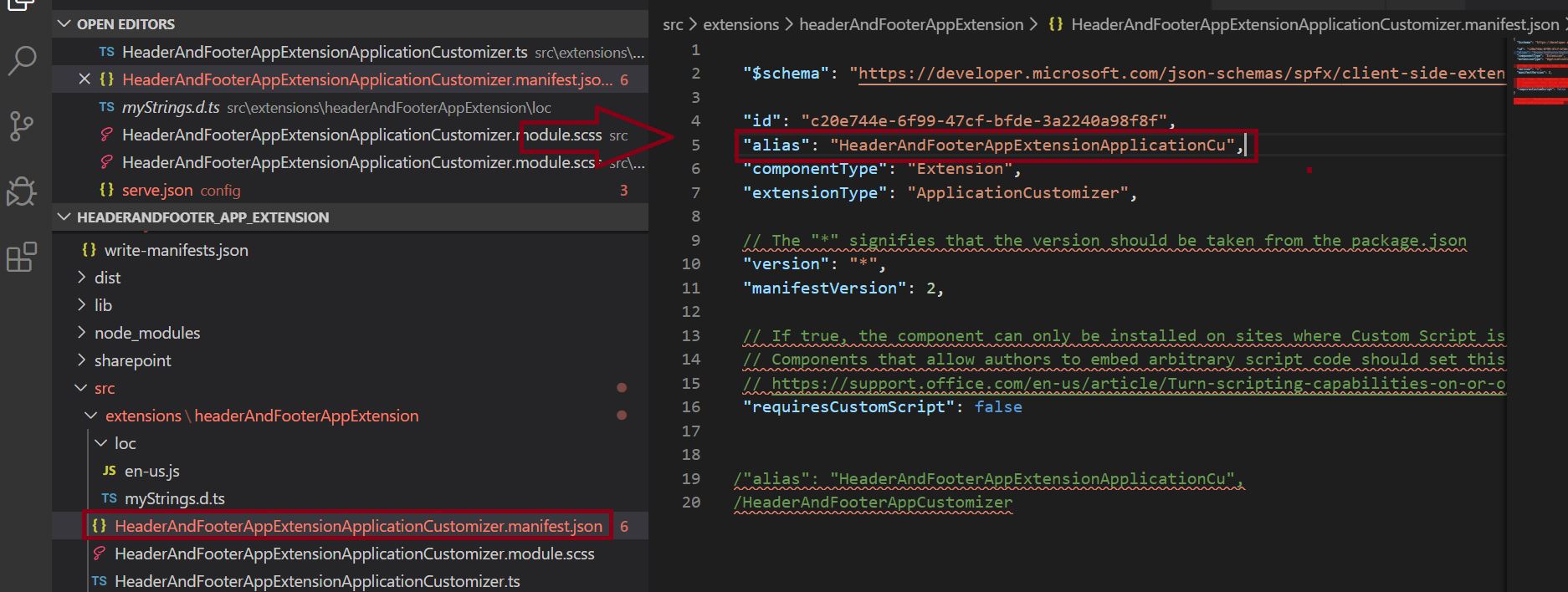
While passing the name of the extension, try to keep length within 40 characters – in the manifest JSON file an alias name is registered. Nevertheless, if you face any issues during running the gulp serve –nobrowser command, we can resolve this by updating the alias entry afterward.
Below is the reference on how to modify the alias name in the manifest.json file?
5. Open the project in the visual studio editor
Run the “Code .” command to open the project in the visual studio editor.
C:\Temp\SPFx\Application Extension\HeaderAndFooter_App_Extension>code .
6. Analysis of code file structure (SPFx footer bottom of page)
Open the HeaderAndFooterAppExtensionApplicationCustomizer.manifest.json file
Go to the below path to open the HeaderAndFooterAppExtensionApplicationCustomizer.manifest.json file.
./src/extensions/headerAndFooterAppExtension/HeaderAndFooterAppExtensionApplicationCustomizer.manifest.json
This file defines your extension type and a unique identifier for your extension. We will need this ID later when we debug and deploy the extension to SharePoint Online.
File Content:
{

  "$schema": "https://developer.microsoft.com/json-schemas/spfx/client-side-extension-manifest.schema.json",

  "id": "c20e744e-6f99-47cf-bfde-3a2240a98f8f",

  "alias": "HeaderAndFooterAppExtensionApplicationCu",

  "componentType": "Extension",

  "extensionType": "ApplicationCustomizer",

  // The "*" signifies that the version should be taken from the package.json

  "version": "*",

  "manifestVersion": 2,

  // If true, the component can only be installed on sites where Custom Script is allowed.

  // Components that allow authors to embed arbitrary script code should set this to true.

  // https://support.office.com/en-us/article/Turn-scripting-capabilities-on-or-off-1f2c515f-5d7e-448a-9fd7-835da935584f

  "requiresCustomScript": false

}
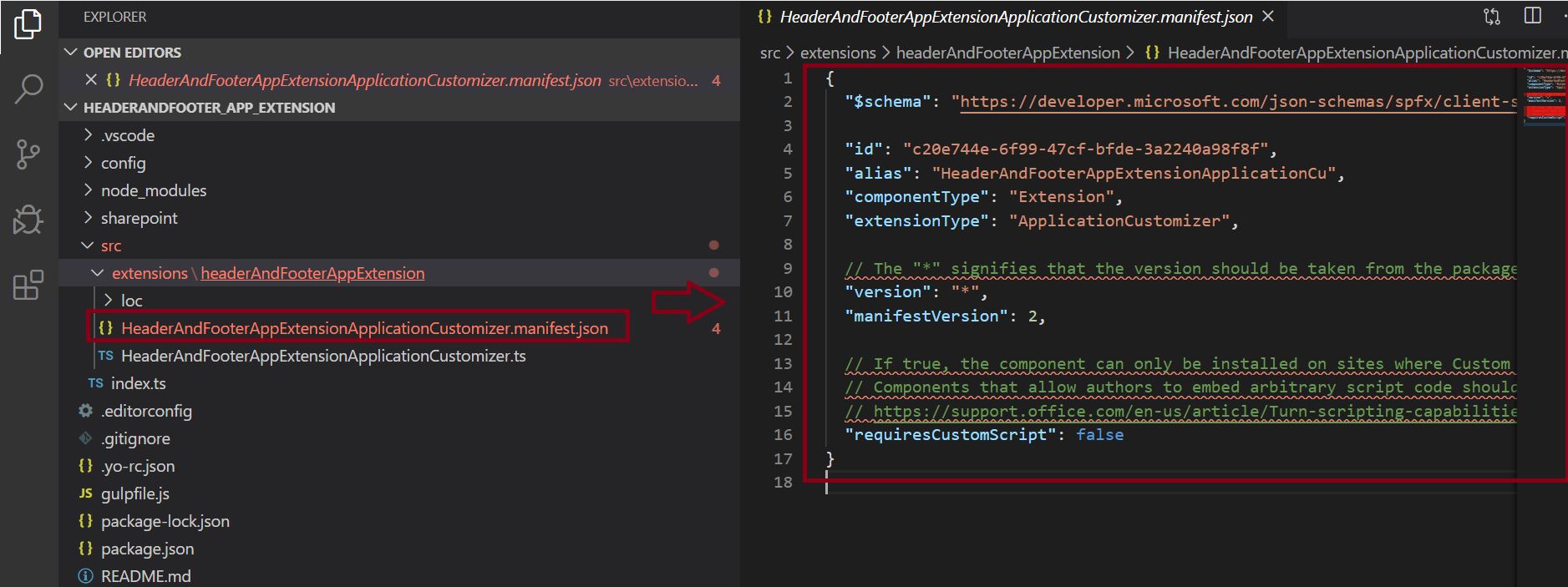
Notes:
- The “*” signifies that the version should be taken from the package.json.
- If true, the component can only be installed on sites where Custom Script is allowed.
6. Steps to implement Application Customizer – Header and Footer (SharePoint Framework header footer)
6.1 Open the HeaderAndFooterAppExtensionApplicationCustomizer.ts file
Go to the below path to open the HeaderAndFooterAppExtensionApplicationCustomizer.ts file.
./src/extensions/headerAndFooterAppExtension/HeaderAndFooterAppExtensionApplicationCustomizer.ts
HeaderAndFooterAppExtensionApplicationCustomizer.ts file content:
import { override } from '@microsoft/decorators';

import { Log } from '@microsoft/sp-core-library';

import {

  BaseApplicationCustomizer

} from '@microsoft/sp-application-base';

import { Dialog } from '@microsoft/sp-dialog';

import * as strings from 'HeaderAndFooterAppExtensionApplicationCustomizerStrings';

const LOG_SOURCE: string = 'HeaderAndFooterAppExtensionApplicationCustomizer';

/**

 * If your command set uses the ClientSideComponentProperties JSON input,

 * it will be deserialized into the BaseExtension.properties object.

 * You can define an interface to describe it.

 */

export interface IHeaderAndFooterAppExtensionApplicationCustomizerProperties {

  // This is an example; replace with your own property

  testMessage: string;

}

/** A Custom Action which can be run during execution of a Client Side Application */

export default class HeaderAndFooterAppExtensionApplicationCustomizer

  extends BaseApplicationCustomizer<IHeaderAndFooterAppExtensionApplicationCustomizerProperties> {

  @override

  public onInit(): Promise<void> {

    Log.info(LOG_SOURCE, `Initialized ${strings.Title}`);

    let message: string = this.properties.testMessage;

    if (!message) {

      message = '(No properties were provided.)';

    }

    Dialog.alert(`Hello from ${strings.Title}:\n\n${message}`);

    return Promise.resolve();

  }

}
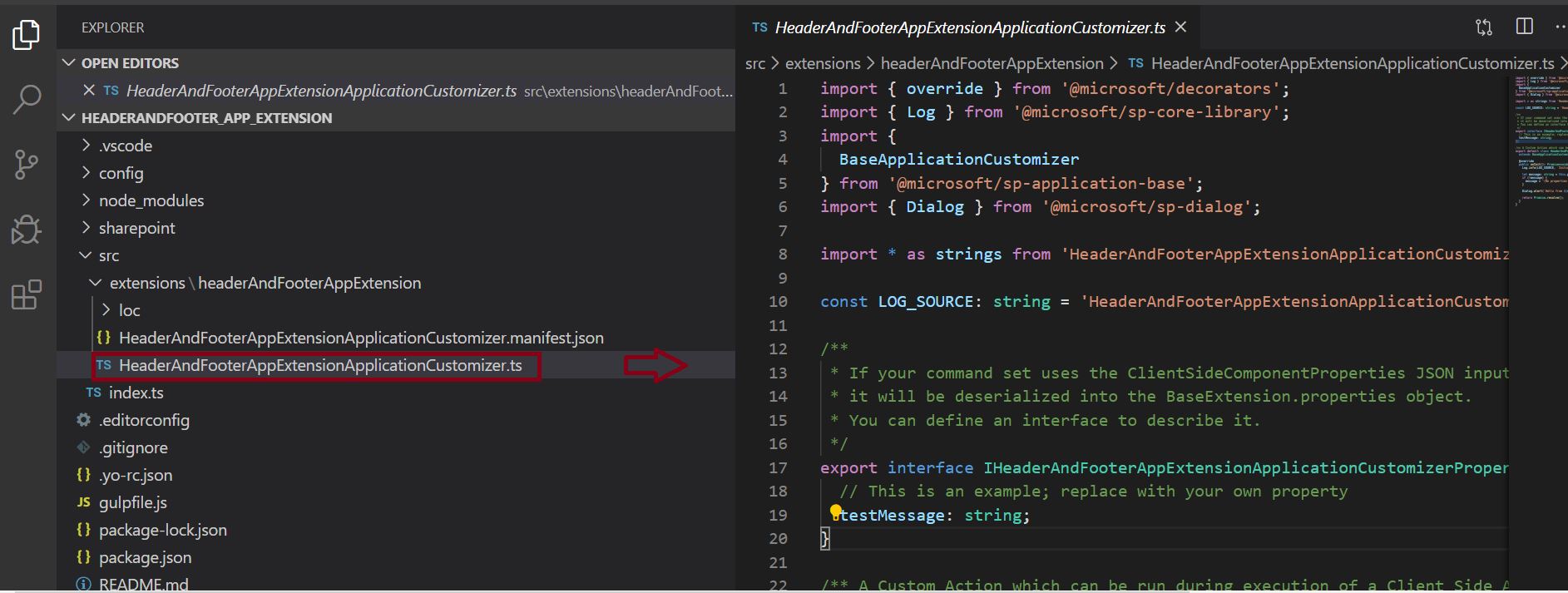
The above-mentioned code is generated thru the out of the SPFx scaffolding process.
Now, let’s customize the above code to implement the header and footer functionality in SharePoint Online site.
In order to get access to placeholders on the page, we need to use the below imports:
import {
BaseApplicationCustomizer,
PlaceholderContent,
PlaceholderName
} from '@microsoft/sp-application-base';
Then, now let’s add our custom property “Top” and “Bottom” in the IHeaderAndFooterAppExtensionApplicationCustomizerProperties interface.
export interface IHeaderAndFooterAppExtensionApplicationCustomizerProperties

 {

  // This is an example; replace with your own property

  //testMessage: string;

  Top: string;

  Bottom: string;

}

Note:
- For our convenience, the SPFx project scaffolding will generate this interface with the “testMessage” which we have commented on now as we have added two real properties (Top and Bottom).
Now, let’s have a look at the HeaderAndFooterAppExtensionApplicationCustomizer.ts file after adding the new codes.

6.2 Implementation of the OnInit() method
Below is the code for OnInit() method which gets executed when the page starts loading, then call the render method displaying the header and footer.
private _topPlaceholderHeader: PlaceholderContent | undefined;

private _bottomPlaceholderFooter: PlaceholderContent | undefined;

  @override

  public onInit(): Promise<void>

  {

    Log.info(LOG_SOURCE, `Initialized ${strings.Title}`);

    this.context.placeholderProvider.changedEvent.add(this, this._renderPlaceHoldersHeaderandFooter);

    //Added the below line code to handle the possible changes on the existence of placeholders.

    this.context.placeholderProvider.changedEvent.add(this, this._renderPlaceHoldersHeaderandFooter);


    //The below code is used to call render method for generating the HTML elements.

    this._renderPlaceHoldersHeaderandFooter();


    return Promise.resolve();

  }

6.2 Implementation of the _renderPlaceHolders() method (SPFx footer bottom of page
If we little scroll down the HeaderAndFooterAppExtensionApplicationCustomizer.ts file we can see that _renderPlaceHoldersHeaderandFooter() has been implemented which is primarily responsible for page rendering for the header and footer functionality.
private _renderPlaceHoldersHeaderandFooter(): void

   {

    console.log('HeaderAndFooterAppExtensionApplicationCustomizer._renderPlaceHoldersHeaderandFooter()');

    console.log('Available placeholders are as below: ',

    this.context.placeholderProvider.placeholderNames.map(name => PlaceholderName[name]).join(', '));


    //Handling the top placeholder - header section

    if (!this._topPlaceholderHeader)

     {

      this._topPlaceholderHeader =

        this.context.placeholderProvider.tryCreateContent(

          PlaceholderName.Top,

          {

            onDispose: this._onDispose

          });


      //The extension should not assume that the expected placeholder is available.

      if (!this._topPlaceholderHeader)

       {

        console.error('The expected placeholder (top heder) was not found.');

        return;

      }


      if (this.properties) {

        let topString: string = this.properties.Top;

        if (!topString) {

          topString = '(The top header property was not defined.)';

        }


        if (this._topPlaceholderHeader.domElement)

         {

          this._topPlaceholderHeader.domElement.innerHTML = `

            <div class="${styles.appCustomHeaderFooter}">

              <div class="ms-bgColor-themeDark ms-fontColor-white ${styles.top}">

                <i class="ms-Icon ms-Icon--Info" aria-hidden="true"></i> ${escape(topString)}

              </div>

            </div>`;

        }

      }

    }


    //Handling the bottom placeholder - Footer section

    if (!this._bottomPlaceholderFooter)

     {

      this._bottomPlaceholderFooter =

        this.context.placeholderProvider.tryCreateContent(

          PlaceholderName.Bottom,

          { onDispose: this._onDispose });


      // The extension should not assume that the expected placeholder is available.

      if (!this._bottomPlaceholderFooter) {

        console.error('The expected placeholder (Bottom Footer) was not found.');

        return;

      }


      if (this.properties) {

        let bottomString: string = this.properties.Bottom;

        if (!bottomString) {

          bottomString = '(The bottom footer property was not defined.)';

        }


        if (this._bottomPlaceholderFooter.domElement)

        {

          this._bottomPlaceholderFooter.domElement.innerHTML = `

            <div class="${styles.appCustomHeaderFooter}">

              <div class="ms-bgColor-themeDark ms-fontColor-white ${styles.bottom}">

                <i class="ms-Icon ms-Icon--Info" aria-hidden="true"></i> ${escape(bottomString)}

              </div>

            </div>`;

        }

      }

    }

 }
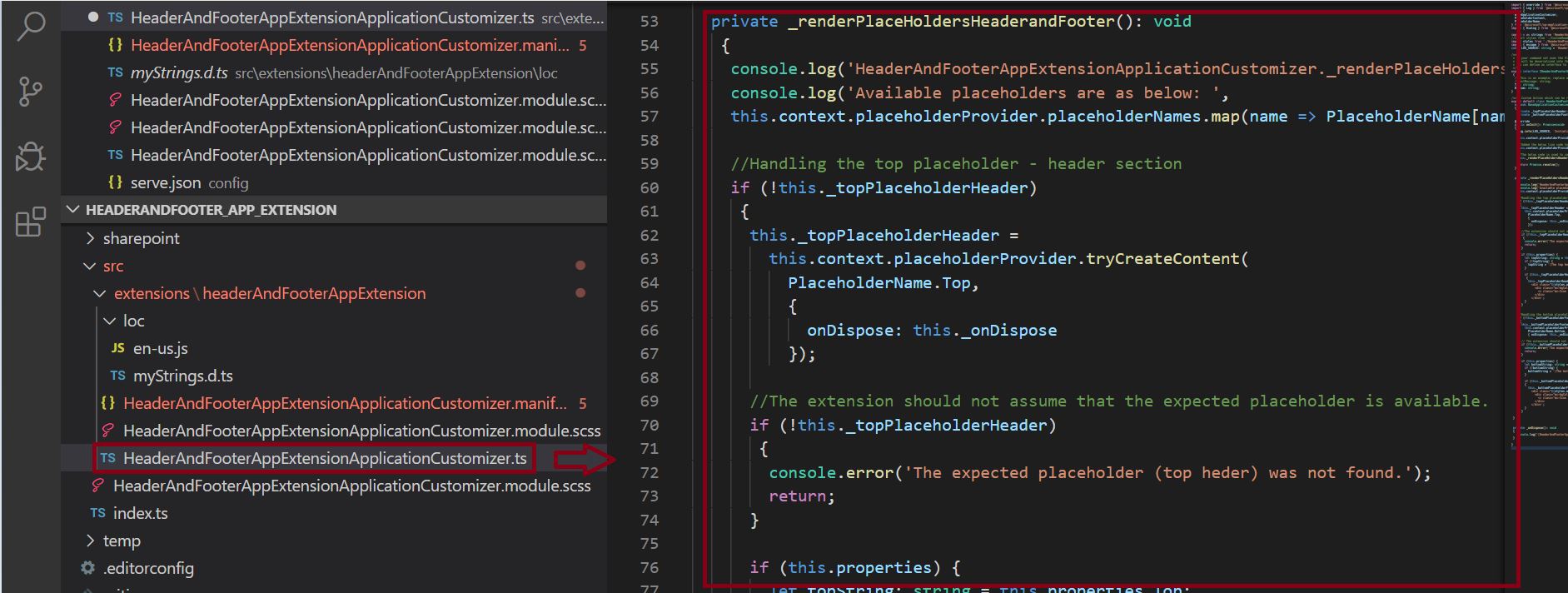
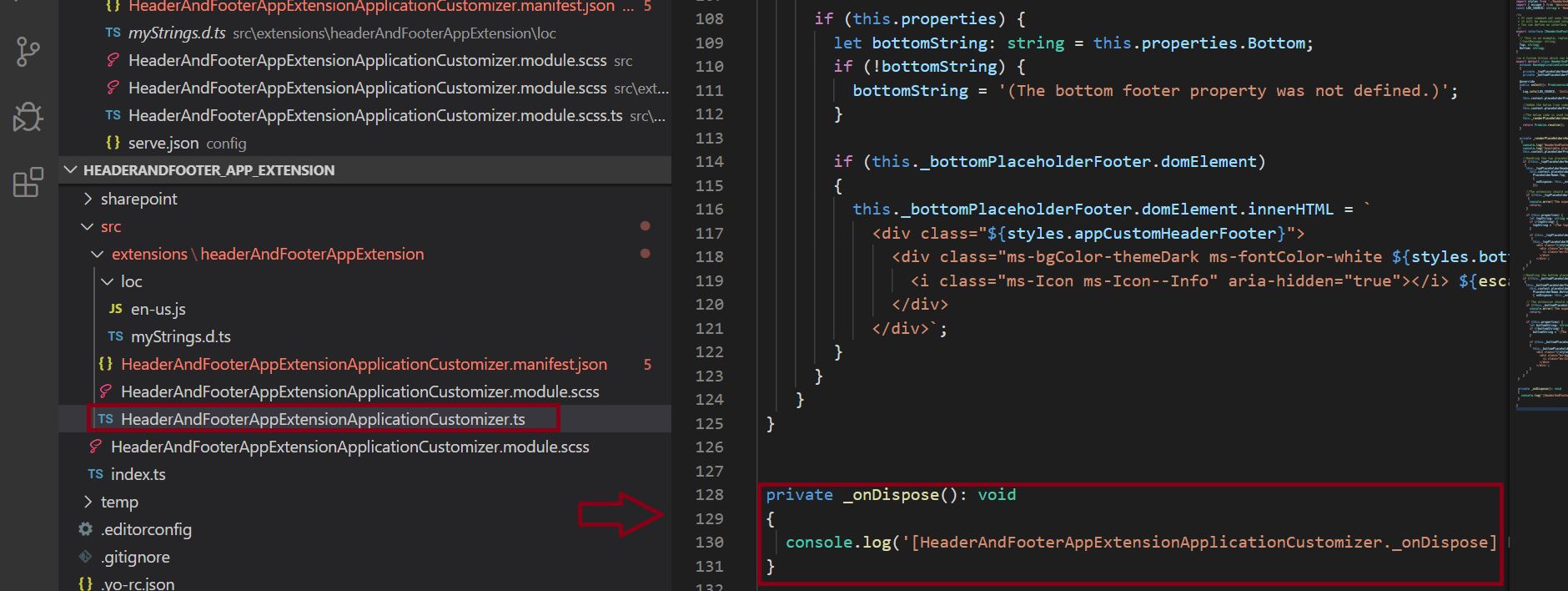
_onDispose() method is used the _renderPlaceHoldersHeaderandFooter() – here is the implementation of the _onDispose() method.
private _onDispose(): void

 {

   console.log('[HeaderAndFooterAppExtensionApplicationCustomizer._onDispose] Disposed from the top header and bottom footer placeholders.');

 }
Notes:
- In the above _renderPlaceHoldersHeaderandFooter() method styles.top and styles.bottom were used, in the subsequent section we will learn how these two CSS classes have been referred here.
6.3 Apply custom CSS for Header and Footer (SharePoint Framework header footer)
Header CSS:
<div class="${styles.appCustomHeaderFooter}">

              <div class="ms-bgColor-themeDark ms-fontColor-white ${styles.top}">

                <i class="ms-Icon ms-Icon--Info" aria-hidden="true"></i> ${escape(topString)}

              </div>

            </div>`;
Footer CSS:
<div class="${styles.appCustomHeaderFooter}">

              <div class="ms-bgColor-themeDark ms-fontColor-white ${styles.bottom}">

                <i class="ms-Icon ms-Icon--Info" aria-hidden="true"></i> ${escape(bottomString)}

              </div>

            </div>`;
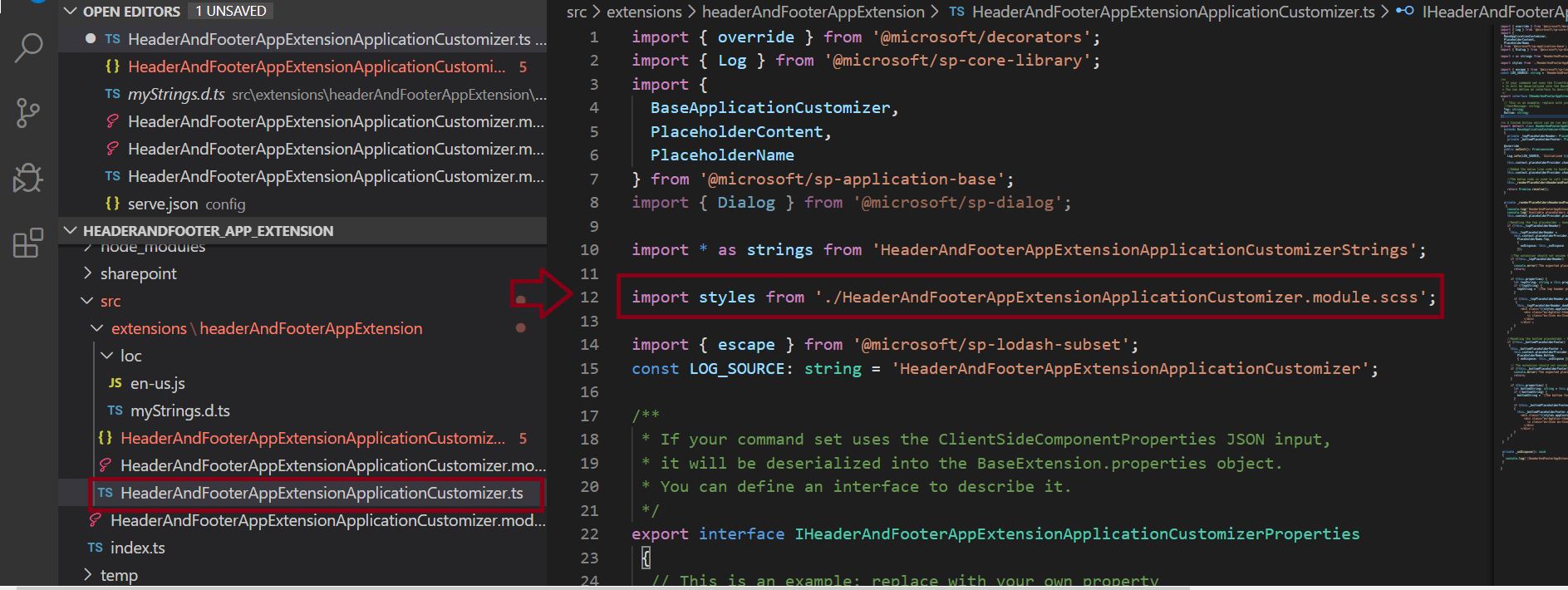
In the above both the header and footer code, we can see those styles.appCustomHeaderFooter, styles.top, styles.bottom – now I will explain how these have been referred to here – or where these actually defined.
Step 1:
Below is the import CSS file:
import styles from './HeaderAndFooterAppExtensionApplicationCustomizer.module.scss';
Step 2:
Below are the .top and .bottom CSS class inside the .appCustomHeaderFooter parent CSS class which is located the custom CSS file – HeaderAndFooterAppExtensionApplicationCustomizer.module.scss file which is located at “\src\extensions\headerAndFooterAppExtension\” folder.
.appCustomHeaderFooter

{

    .top

    {

     color:Red;

     line-height:2.5;

     align-items: center;

      height:60px;

      justify-content: center;

      text-align:center;

      font-weight:bold;

      display: flex;

      font-size:30px

    }


    .bottom

     {

      color:Red;

      height:40px;

      align-items: center;

      line-height:2.5;

      font-weight:bold;

      justify-content: center;

      text-align:center;

      display: flex;

      font-size:30px

    }

  }
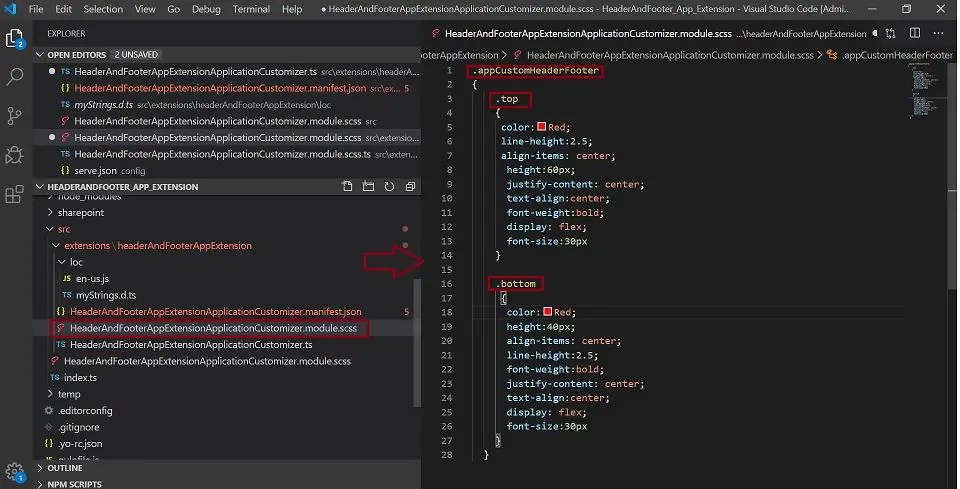
Create a custom CSS file in SPFx Application customizer projectStep 3: Add another .ts file in the same path (“\src\extensions\headerAndFooterAppExtension\”) as HeaderAndFooterAppExtensionApplicationCustomizer.module.scss.ts file, and the below should be content of the file:
/* tslint:disable */

require("./HeaderAndFooterAppExtensionApplicationCustomizer.module.css");

const styles = {

  appCustomHeaderFooter: 'appCustomHeaderFooter_30e7ead0',

  top: 'top_30e7ead0',

  bottom: 'bottom_30e7ead0'

};

export default styles;

/* tslint:enable */

SharePoint Framework header footer demo – verify the custom header and footer application extension from SharePoint Online page
Open serve.json from the config folder.
Now, update the properties section to include Top and Bottom messages and Page URLs.
After updating, the file content should be as below:
{

  "$schema": "https://developer.microsoft.com/json-schemas/core-build/serve.schema.json",

  "port": 4321,

  "https": true,

  "serveConfigurations": {

    "default": {

      "pageUrl": "https://globalsharepoint2020.sharepoint.com/sites/CustomSearchRND/SitePages/SPFxAppCustomizerTest.aspx",

      "customActions": {

        "c20e744e-6f99-47cf-bfde-3a2240a98f8f": {

          "location": "ClientSideExtension.ApplicationCustomizer",

          "properties": {

            "Top": "This custom header has been developed by SPFx framework.",

            "Bottom": "This custom footer has been developed by SPFx framework."

          }

        }

      }

    },

    "headerAndFooterAppExtension": {

      "pageUrl": "https://globalsharepoint2020.sharepoint.com/sites/CustomSearchRND/SitePages/SPFxAppCustomizerTest.aspx",

      "customActions": {

        "c20e744e-6f99-47cf-bfde-3a2240a98f8f": {

          "location": "ClientSideExtension.ApplicationCustomizer",

          "properties": {

            "Top": "This custom header has been developed by SPFx framework.",

            "Bottom": "This custom footer has been developed by SPFx framework."

          }

        }

      }

    }

  }

}

- By default, the page URL would be:
"https://contoso.sharepoint.com/sites/mySite/SitePages/myPage.aspx", here we need a pass a custom page URL from our tenant.
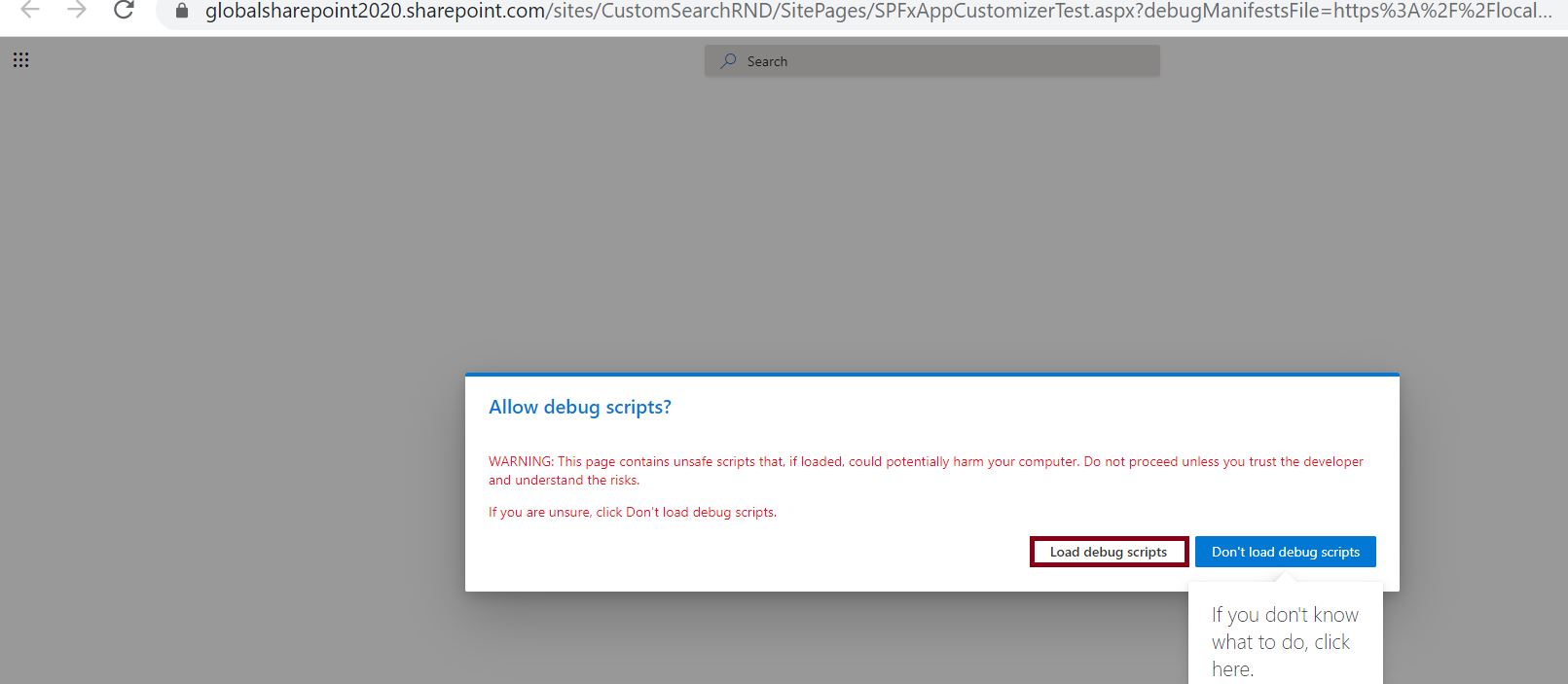
Click on the “Load debug scripts” button.
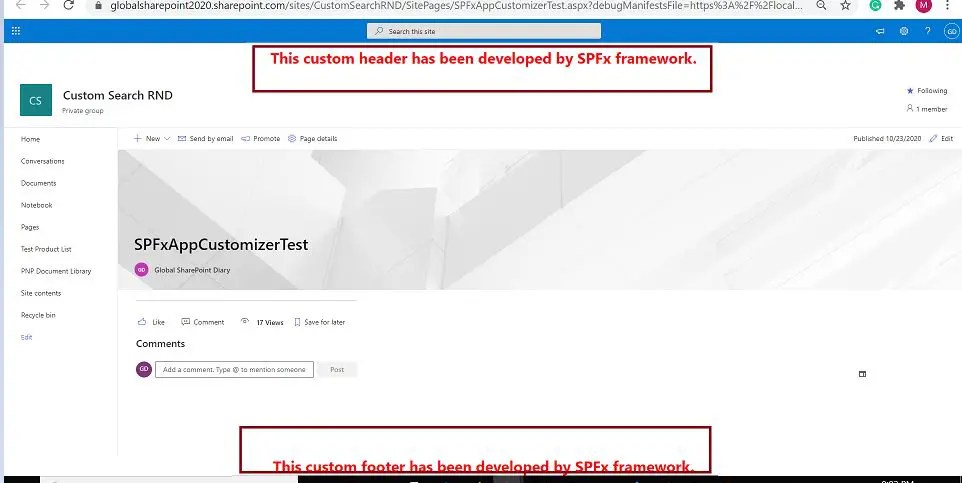
Then, we can see that the custom header and footer below mentioned messages have been displayed on the page:
- This custom header has been developed by the SPFx framework.
- This custom footer has been developed by the SPFx framework.
SharePoint Framework header footer – when should we use the extension type solution in the SPFx Framework?
In the SPFx framework, we can develop three types of client-side solutions such as:
- WebPart
- Extension
- Library
As we can see the “Extension” type is one among them. Each type of the above project type has its own need and scope when it comes to customizing the SharePoint solution. For example, using the web part we can display the SharePoint content in a specific area of the page, using the “Extension” type we can customize the site level object such as site header, footer, navigation, etc., and using the “Library” type project we can customize the list/library, view, etc.
Download Source Code: SharePoint Framework header footer
The source code of the above SPFx header footer can be downloaded from the SharePoint Framework header footer GitHub.
Summary: SharePoint Framework header footer (What is Application Customizer in SPFx)
Thus, in this article, we have learned about how to add the custom header and footer message in the SharePoint Online page using the SPFx framework extension application customizer project, we can summarize the learning as below:
- Using SPFx add a custom header and footer message in the SharePoint Online Page
- How to create an extension project step-by-step process – the scaffolding process
- How to modify the alias name in the manifest.json file?
- Steps to implement Application Customizer – Header and Footer
- What does the HeaderAndFooterAppExtensionApplicationCustomizer.ts file content?
- How to implement the OnInit() method?
- How to implement the _renderPlaceHolders() method?
- How to apply custom CSS for Header and Footer using the SPFx framework extension application customizer?
- Demo – verify the custom header and footer application extension from SharePoint Online page
See Also: SharePoint Framework header footer (SharePoint custom header)
You may also like the below SharePoint SPFx articles:
- Using SPFx build your first SharePoint Framework Extension – Hello World
- How to pass textbox entry in SPFx framework as a parameter – SharePoint Online
- Create list in SharePoint Online using SPFx (SharePoint Framework)
- SharePoint Online: Develop custom search web part using PnP JS and SharePoint Framework(SPFx)
- SharePoint Online: Use theme color in SharePoint SPFx framework web part
- SharePoint Online: CRUD operations using SPFx ReactJS framework
- SharePoint Online: CRUD operations using SPFx no javascript framework
- Develop your first hello world web part in sharepoint framework (SPFx)
- Understanding solution structure in SharePoint framework (SPFx)
- Create custom property in SharePoint Framework – SPFx web part pane
- Get list items from SharePoint using SPFx framework(No Javascript Framework)
- Custom search result page in SharePoint Online – SPFx PnP Modern Search solution
Hope you have enjoyed reading this article and helped you. If you would like to appreciate our efforts or if you have a better solution or a different opinion, please write to the below comment section and do share this with your friends and colleagues. 🙂
About Post Author

Discover more from Global SharePoint
Subscribe to get the latest posts sent to your email.