

 By
By 
Text field in SPFx – in this article, we will learn about how to pass textbox entries in the SPFx framework as a parameter. Like any other programming language, in the SPFx framework also we can design a user interface to enter the input from the user which can be passed on to the SPFx framework coding. In this demo, we will see how to pass two textbox entries like “List Name”, and “List Description” from the SPFx web part user interface that can be passed on to the coding.
Key-Highlights: Text field in SPFx
- Demo – Display web part in SharePoint online page
- Explanation of coding – web part rendering
- Button click event method (function) to create the list
- Registration of createNewCustomListToSPO() method in AddEventListeners() collection method
- Registration of AddEventListeners() method inside the render() method
- How to add an event listener for a button click in the SPFx Web part?
- Where to add an event listener when using SPFx?
Demo (Text field in SPFx) – Display web part in SharePoint online page
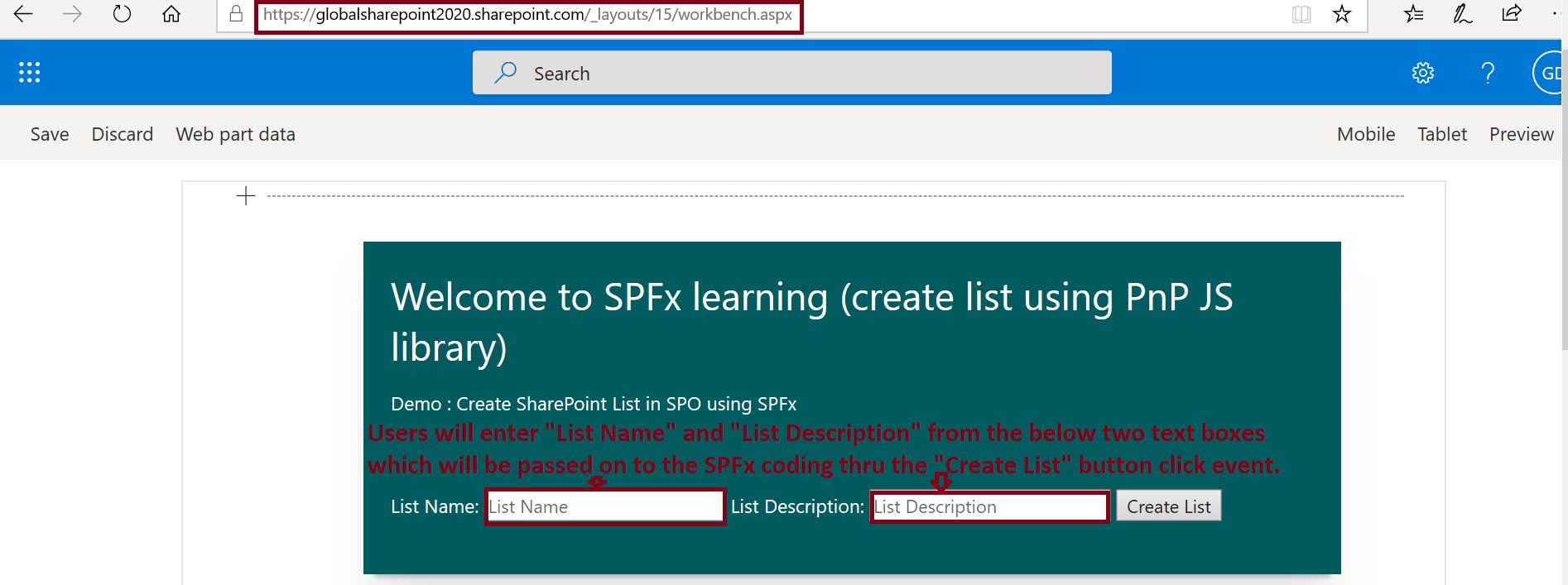
Display the SPFx web part on the SharePoint Online workbench page – globalsharepoint2020.sharepoint.com/_layouts/15/workbench.aspx.
Users will enter “List Name” and “List Description” from the below two text boxes which will be passed on to the SPFx coding thru the “Create List” button click event.
Explanation of coding – web part rendering (Text field in SPFx)
Now, I will explain how does the “List Name” and “List Description” pass on to SPFx coding to create the list in SharePoint Online?
The below-highlighted HTML coding is responsible for list name and list description rendering.
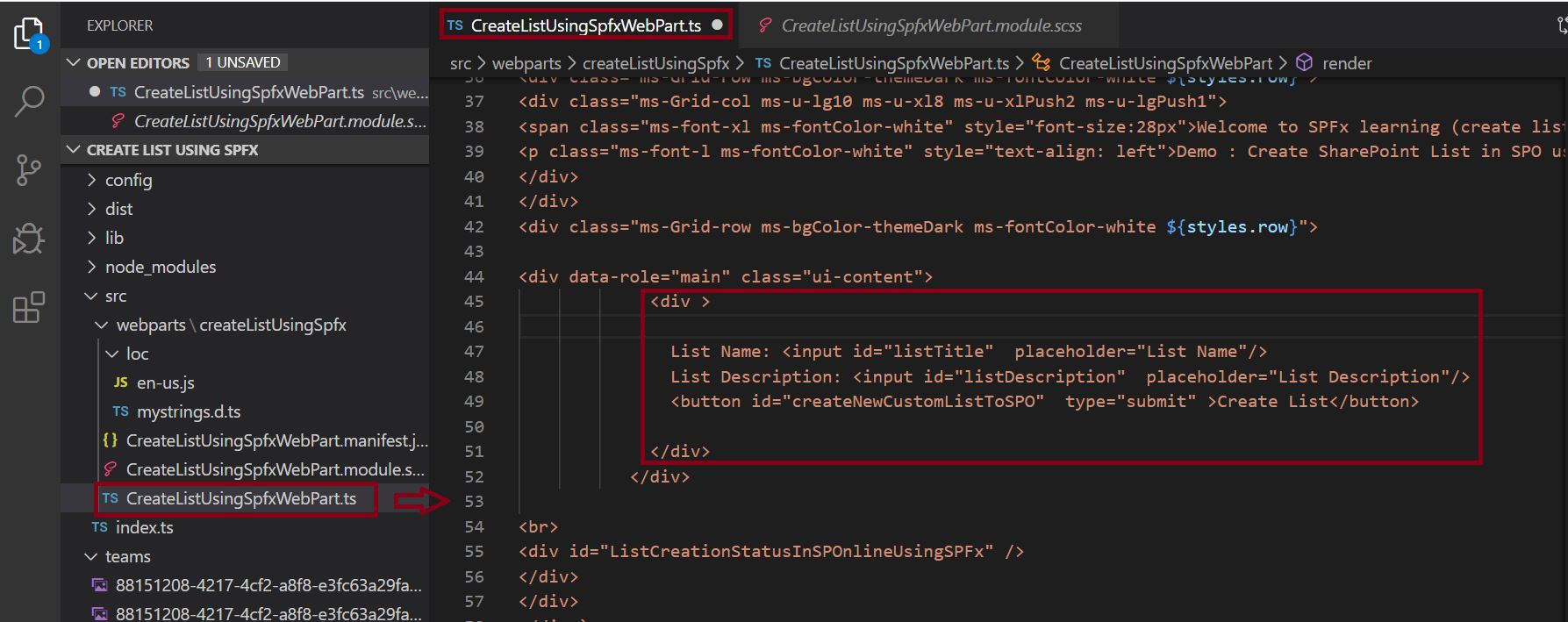
<div data-role="main" class="ui-content">

             <div>

               List Name: <input id="listTitle"  placeholder="List Name"/>

               List Description: <input id="listDescription"  placeholder="List Description"/>

               <button id="createNewCustomListToSPO"  type="submit" >Create List</button>

             </div>

           </div>

<br>

<div id="ListCreationStatusInSPOnlineUsingSPFx" />
Button click event method (function) to create the list (Text field in SPFx)
private CreateListInSPOUsinPnPSPFx(): void

    {

        let myWeb = new Web(this.context.pageContext.web.absoluteUrl);

        //let mySPFxListTitle = "CustomList_using_SPFx_Framework";

        let mySPFxListTitle = document.getElementById('listTitle')["value"];

        //let mySPFxListDescription = "Custom list created using the SPFx Framework";

        let mySPFxListDescription = document.getElementById('listDescription')["value"];

        let listTemplateID = 100;

        let boolEnableCT = false;

        myWeb.lists.add(mySPFxListTitle, mySPFxListDescription, listTemplateID, boolEnableCT).then(function(splist)

        {

            document.getElementById("ListCreationStatusInSPOnlineUsingSPFx").innerHTML += `The SPO new list ` + mySPFxListTitle + ` has been created successfully using SPFx Framework.`;

        });

    }
- If we observe the above coding, we can see it is exactly the traditional javascripting DOM object model coding which reads the input control thru its ID (document.getElementById(‘listTitle’)[“value”] and document.getElementById(‘listDescription’)[“value”].
By now we have created the method to handle the list creation logic based on the user input (list title and list description), now we need to register this list creation method to handle the button click (Create List) event in the event listeners collection.
Registration of createNewCustomListToSPO() method in AddEventListeners() collection method (Text field in SPFx)
private AddEventListeners() : void

    {

     document.getElementById('createNewCustomListToSPO').addEventListener('click',()=>this.CreateListInSPOUsinPnPSPFx());

    }
In the above coding, ‘createNewCustomListToSPO‘ is the ID of the “Create List” button in the web part, the rendering part is defined here:
          <div >

               List Name: <input id="listTitle"  placeholder="List Name"/>

               List Description: <input id="listDescription"  placeholder="List Description"/>

               <button id="createNewCustomListToSPO"  type="submit" >Create List</button>

             </div>
Registration of AddEventListeners() method inside the render() method (Text field in SPFx)
We have now, a list creation custom method (function), and the event listeners collection is ready – we need to call this event listeners collection method – AddEventListeners() inside the render method like below:

public render(): void

    {

        this.domElement.innerHTML = `

<div class="${styles.createListUsingSpfx}">

<div class="${styles.container}">

<div class="ms-Grid-row ms-bgColor-themeDark ms-fontColor-white ${styles.row}">

<div class="ms-Grid-col ms-u-lg10 ms-u-xl8 ms-u-xlPush2 ms-u-lgPush1">

<span class="ms-font-xl ms-fontColor-white" style="font-size:28px">Welcome to SPFx learning (create list using PnP JS library)</span>

<p class="ms-font-l ms-fontColor-white" style="text-align: left">Demo : Create SharePoint List in SPO using SPFx</p>

</div>

</div>

<div class="ms-Grid-row ms-bgColor-themeDark ms-fontColor-white ${styles.row}">

<div data-role="main" class="ui-content">

             <div >


               List Name: <input id="listTitle"  placeholder="List Name"/>

               List Description: <input id="listDescription"  placeholder="List Description"/>

               <button id="createNewCustomListToSPO"  type="submit" >Create List</button>


             </div>

           </div>

<br>

<div id="ListCreationStatusInSPOnlineUsingSPFx" />

</div>

</div>

</div>`;

        this.AddEventListeners();

    }
Summary: Text field in SPFx (how to pass textbox entry in SPFx framework as a parameter)
Thus, in this article, we have learned about how to pass the textbox input parameter to SPFx web part coding, the learning can be summarized as below:
- We have seen the demo of how to display the web part on the SharePoint online page.
- Explanation of coding – how does the web part get rendered?
- How to handle the button click event method (function) to create the list
- How to register a new method inside AddEventListeners() collection method
- How to call or register the AddEventListeners() method inside the render() method
- How to add an event listener for a button click in the SPFx Web part?
- Where to add an event listener when using SPFx?
See Also: SPFx SharePoint Tutorial
You may also like the below SharePoint SPFx articles:
- Create list in SharePoint Online using SPFx (SharePoint Framework)
- SharePoint Online: Develop custom search web part using PnP JS and SharePoint Framework(SPFx)
- SharePoint Online: Use theme color in SharePoint SPFx framework web part
- SharePoint Online: CRUD operations using SPFx ReactJS framework
- SharePoint Online: CRUD operations using SPFx no javascript framework
- Develop your first hello world web part in sharepoint framework (SPFx)
- Understanding solution structure in SharePoint framework (SPFx)
- Create custom property in SharePoint Framework – SPFx web part pane
- Get list items from SharePoint using SPFx framework(No Javascript Framework)
- Custom search result page in SharePoint Online – SPFx PnP Modern Search solution
- Build your first SharePoint client-side web part (Hello World part 1)
About Post Author

Discover more from Global SharePoint
Subscribe to get the latest posts sent to your email.