

 By
By 
In this Microsoft Copilot Studio Greet Users Dynamically tutorial, we will learn about how to greet logged-in users dynamically based on their time zone and locale. And how to welcome logged-in users with their names dynamically in the Copilot Studio agent. It always gives a personal feeling when your chatbot welcomes or greets by saying Hello User, Good morning, Good afternoon, Good evening, etc.
Creating a personalized user experience is a powerful way to make your application more engaging and user-friendly. A simple yet effective way to do this is by greeting users with dynamic messages like “Good Morning,” “Good Afternoon,” or “Good Evening,” based on their local time.
This article will guide you through implementing this feature in Copilot Studio, leveraging time zones, dynamic user interaction, and programmatic greetings. We’ll explain the importance of personalization, explore the technical steps, and provide practical examples. Let’s dive in!
Why Personalized Greetings Matter
Personalization is no longer a luxury in software; it’s an expectation. Dynamic greetings:
- Enhance User Experience: A greeting tailored to the user’s time of day feels more intuitive and thoughtful.
- Encourage Engagement: Users are more likely to interact with apps that make them feel acknowledged.
- Build Brand Loyalty: Small touches like this show attention to detail, setting your application apart.
By implementing a system that recognizes a user’s time zone and tailors greetings accordingly, you foster stronger connections with users.
Understanding Copilot Studio
Before diving into the technical aspects, it’s essential to understand what Copilot Studio is and why it’s a game-changer for developers. Copilot Studio is an innovative platform designed to empower developers with AI-driven code assistance that streamlines and accelerates the development process. Whether you’re working on complex workflows, automating repetitive tasks, or building dynamic solutions, Copilot Studio integrates seamlessly with a variety of tools and platforms, making it highly versatile.
By leveraging advanced machine learning models, it provides context-aware suggestions, reducing coding errors and enhancing productivity. Developers can focus more on creativity and problem-solving while letting Copilot Studio handle routine coding challenges. Moreover, it’s not just about code — the platform is built to simplify user interface enhancements, helping teams create intuitive and user-friendly applications. Whether you’re a seasoned developer or just starting, Copilot Studio acts as a trusted assistant, enabling you to bring your ideas to life more efficiently.
How to Create Dynamic Greetings Based on Time Zones in General?
Here’s a breakdown of the process:
- Determine the User’s Time Zone
- Extract the Current Time
- Classify the Time of Day
- Display Dynamic Greetings
- Test the Implementation
1. Determining the User’s Time Zone
To greet users based on their local time, you need to identify their time zone. The Intl.DateTimeFormat object in JavaScript simplifies this process.
javascript
This code snippet fetches the user’s time zone based on their device settings. It’s accurate and lightweight, making it ideal for real-time applications.
2. Extract the Current Time
Once the time zone is determined, fetch the current time using the Date object.
Here, the toLocaleTimeString method formats the time according to the user’s local settings.
3. Classify the Time of Day
Divide the day into morning, afternoon, and evening to tailor your greeting. Use the hour component of the Date object to determine the classification:
This logic splits the day into:
- Morning: 5 AM to 11:59 AM
- Afternoon: 12 PM to 4:59 PM
- Evening: 5 PM onwards
4. Display Dynamic Greetings
To make the greeting visible to the user, inject it into the application’s UI. If you’re using a web-based UI, you can use DOM manipulation:
In this example:
greetingholds the dynamic message.userNameis the user’s name fetched from your authentication system.
5. Test the Implementation
Testing ensures the system works correctly across various scenarios. Consider the following test cases:
- Users in different time zones.
- Edge cases, like when the time changes from morning to afternoon.
- Daylight saving time adjustments.
Use mock functions or tools like jest for automated testing to simulate time zone changes.
Best Practices for Implementing Dynamic Greetings
Here are some tips to ensure your implementation is smooth and effective:
Use Reliable APIs
While the Intl object is native to JavaScript, you might consider using APIs like Moment.js or luxon for more complex time zone operations.
Fallback Mechanisms
Not all devices correctly report their time zones. Implement a fallback mechanism using an IP-based geolocation service like ip-api to estimate the user’s location.
Handle Edge Cases
Pay attention to international users:
- 24-hour format users might prefer different greeting logic.
- Users in extreme time zones (like UTC+14) need thorough testing.
All the above examples used the Javascript code, so, in general, you can implement the dynamic greetings logic in any web application where Javascript is supported. Now, I will convert the above javascript coding into a Power FX formula and use it in the Copilot Studio topic.
How to Greet Users Dynamically Based on Time Zones in Copilot Studio?
Login to your Copilot Studio.
Create a demo test agent (earlier known as Agent).
Test your Copilot locally, just say “Hi”.

You will be greeted as good morning,good afternoon, or good evening based on the local time you started chatting. I will show you how I did that. Double-click on the response you got from Copilot; generally, you will get only “Hello, how can I help you today?”
Once you double-click on the Copilot response, you will be taken to the right topic.
Create a string variable and assign the below formula for the value:
If(

    And(Hour(Now()) >= 5, Hour(Now()) < 12),

    "Good Morning",

    If(

        And(Hour(Now()) >= 12, Hour(Now()) < 17),

        "Good Afternoon",

        "Good Evening"

    )

)

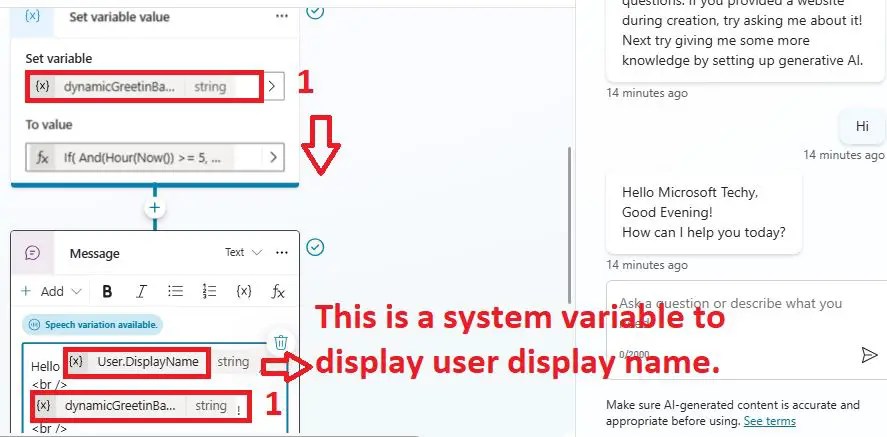
Pass the dynamic greeting variable to message box as shown below:
Note:
- User.DisplayName: This is a system variable to display user display name.
How to welcome the logged-in user with the name in Custom Copilot using Copilot Studio?
Now, I will show you the very interesting things on this topic. Generally, when users log in to Copilot Studio to test the custom Copilot, they will be welcome, like with the below text:
“Hello, I’m Demo Agent (Copilot), a virtual assistant. Just so you are aware, I sometimes use AI to answer your questions. If you provided a website during creation, try asking me about it! Next try giving me some more knowledge by setting up generative AI.”

Basically, it is welcoming with the agent name (copilot name) and some welcome messages, right? Now, I will customise this message and make the greeting more personalised and dynamic. The copilot will be welcomed by the logged user name and greetings like good morning, good afternoon, or good evening based on the logged-in user local time zone.
Just double click on the Copilot auto-generated out of the box welcome message text; this will take you to the right topic that has triggered or generated this message. Here, we can see it is the “Conversation Start” topic.

Now, I will show you how to customise this out-of-the-box message where I will add a dynamic user or logged-in user display name along with the dynamic greeting message like good morning, good afternoon, or good evening based on the logged-in user local time zone and change the welcome message text to more personal feelings.
Now, I have removed out of the box text from the Conversation Start topic’s message node where I have passed logged in user display name (which is a system variable), then passed the dynamic greeting custom variable where I have handled dynamic greeting welcome message as shown in the above demo, then added the text like “How may I help you today?”

Note:
- You can change the welcome message text “How may I help you today?” to as per your requirement.
To further improve this feature, consider:
- Localization: Translate greetings into the user’s preferred language.
- Seasonal Greetings: Incorporate festive messages like “Happy Holidays” during Christmas.
- Interactive Elements: Let users customize how they’re greeted, making it more engaging.
YouTube Video Demo: How to Customize Copilot Studio Greeting and Welcome Message
Conclusion: Dynamic Greeting Message in Copilot Studio
Thus, in this article, we have learnt how to greet users dynamically based on their local login time, like Good morning, Good afternoon, or Good evening. And we also we learned how to welcome logged-in users with their names dynamically in the Copilot Studio agent.
Adding dynamic greetings to your application is a simple yet effective way to enhance personalization and user engagement. Using Copilot Studio, you can quickly implement this feature with JavaScript and time zone APIs. Not only does this improve user experience, but it also positions your application as modern and user-centric.
If you’re ready to take your app to the next level, start implementing dynamic greetings today. Your users will thank you for the personal touch!
About Post Author

Discover more from Global SharePoint
Subscribe to get the latest posts sent to your email.