

 By
By 
In this “Get all files in a folder Power Automate” tutorial, we will learn how to get all files from a given folder in a SharePoint document library using Power Automate. Before getting into the demo, let us understand what the Get Items action of Power Automate offers.
What is Get Items action in Power Automate?
In Power Automate, the “Get items” action is used to retrieve items from a SharePoint list. This action allows you to pull data from a specific SharePoint list and use that data within your flow for various operations such as filtering, updating, or processing the items.
Key Features of the “Get items” Action
- List Selection
- You can select the SharePoint site and the list from which you want to retrieve items.
- Filter Query
- Allows you to apply OData queries to filter items based on specific conditions (e.g., retrieving items where a status column is equal to ‘Completed’).
- Order By
- Specifies the order in which items should be returned. You can order items based on one or more fields (e.g., ordering by creation date).
- Top Count
- Limits the number of items returned by the query. For example, you can retrieve only the top 10 items.
- Expand Query
- Used to retrieve additional fields from related lookup fields, providing more detailed information in a single query.
- Pagination
- Supports pagination to handle large lists by retrieving items in batches.
How to Use the “Get items” Action in Power Automate
- Create a New Flow
- Go to Power Automate and create a new flow (e.g., Automated, Instant, or Scheduled flow).
- Add “Get items” Action
- Add a new action by clicking on the “New step” button.
- Search for “Get items” and select the action from the list of SharePoint actions.
- Configure the “Get items” Action
- Site Address: Select or enter the URL of the SharePoint site containing the list.
- List Name: Choose the name of the list from which you want to retrieve items.
- Optional Configuration
- Filter Query: Enter an OData filter query to filter the items (e.g.,
Status eq 'Completed'). - Order By: Specify fields to sort the items (e.g.,
Created desc). - Top Count: Enter a number to limit the number of items returned.
- Expand Query: Use this to retrieve additional fields from lookup columns.
- Filter Query: Enter an OData filter query to filter the items (e.g.,
- Use Retrieved Items in the Flow
- The “Get items” action will return an array of items that you can loop through or process in subsequent steps of your flow.
- Use actions like “Apply to each” to iterate over the retrieved items and perform further actions (e.g., updating items, sending emails).
Example Scenario
Imagine you want to create a flow that retrieves all items from a “Tasks” list where the task status is “Pending” and sends an email reminder for each pending task.
- Create an Automated Flow Triggered by a Schedule
- Create a new scheduled flow that runs daily.
- Add “Get items” Action
- Configure the action to retrieve items from the “Tasks” list with a filter query
Status eq 'Pending'.
- Configure the action to retrieve items from the “Tasks” list with a filter query
- Loop Through Items
- Add an “Apply to each” action to loop through the retrieved items.
- Send Email for Each Pending Task
- Inside the loop, add a “Send an email” action to send a reminder email for each pending task, using fields from the retrieved items (e.g., task title, due date).
By configuring and using the “Get items” action in Power Automate, you can efficiently retrieve and process SharePoint list items within your automated workflows.
Method 1: Using Limit Entries to Folder to get all files in a folder Power Automate
Select your folder using the “Limit Entries to Folder” method, and get all files from the selected folder path.
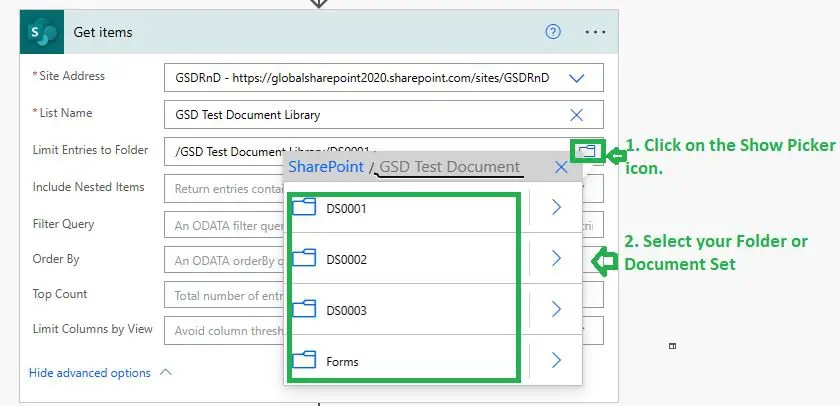
Now, if we execute the Power Automate, we will get all files from the selected folder path: “/GSD Test Document Library/DS0001”

Notes:
- The limit entries to folders option is available both in Get items and Get files (properties only).
- Sometimes, the limit entries to folder option doesn’t work both in Get items and Get files (properties only). That means even if you have documents in the folder, it doesn’t retrieve them.
- After getting the result from the Get Items or Get Files (properties only) method, you can loop through each document using the apply to each control loop.
Method 2: Using List Folder to get all files in a folder Power Automate
Add a list folder action and select your folder as in the above method.

In file identifier, click on the show picker icon, select your document library, and select your desired folder or document set.

Demo: Using List Folder to get all files in a folder Power Automate
Now, after successfully executing the flow, we will get all files from the selected folder path.
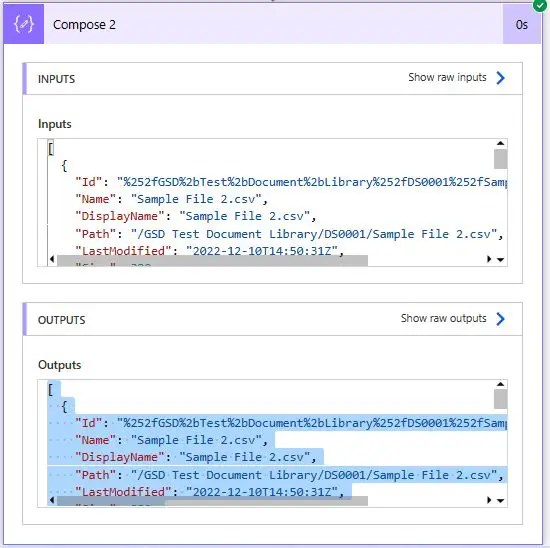
List Folder Output in Power Automate
Below is the output of List Folder execution (example with a single file):
  {
    "Id": "%252fGSD%2bTest%2bDocument%2bLibrary%252fDS0001%252fSample%2bFile%2b1.csv",
    "Name": "Sample File 1.csv",
    "DisplayName": "Sample File 1.csv",
    "Path": "/GSD Test Document Library/DS0001/Sample File 1.csv",
    "LastModified": "2022-12-10T14:49:35Z",
    "Size": 380,
    "MediaType": "text/csv",
    "IsFolder": false,
    "ETag": "\"{10951643-66B8-4EE9-AB1C-D665D7AF0BF8},4\"",
    "FileLocator": "dataset=aHR0cHM6Ly9nbG9iYWxzaGFyZXBvaW50MjAyMC5zaGFyZXBvaW50LmNvbS9zaXRlcy9HU0RSbkQ=,id=JTI1MmZHU0QlMmJUZXN0JTJiRG9jdW1lbnQlMmJMaWJyYXJ5JTI1MmZEUzAwMDElMjUyZlNhbXBsZSUyYkZpbGUlMmIxLmNzdg=="
  }
Metadata returns by List Folder action in Power Automate
Below are the metadata or file properties returned by the list folder action in Power Automate:
- ID
- Name
- DisplayName
- Path
- LastModified
- Size
- MediaType
- IsFolder
- ETag
- FileLocator
Note:
- In the above list, “ID” is not an integer; it returns the file relative path. example given below. So, if you want to query a list item using Get Item or any other method using this ID parameter, it will not work.
"Id": "%252fGSD%2bTest%2bDocument%2bLibrary%252fDS0001%252fSample%2bFile%2b2.csv",
Disadvantage of List Folder action in Power Automate
As we see in the result, we cannot get the value of custom metadata columns in the list folder action; it returns only the out-of-the box file attribute. So, this method is not the right choice if you want to deal with custom metadata columns from the SharePoint Online document library.
Note:
- Like the Get Items and Get Files (properties only) methods, we can loop through each item in the result of the folder action.
Method 3: Using the “Send an HTTP request to SharePoint” to get all files in a folder Power Automate
Using the “Send an HTTP request to SharePoint” Power Automate action, we can get all files in a folder.
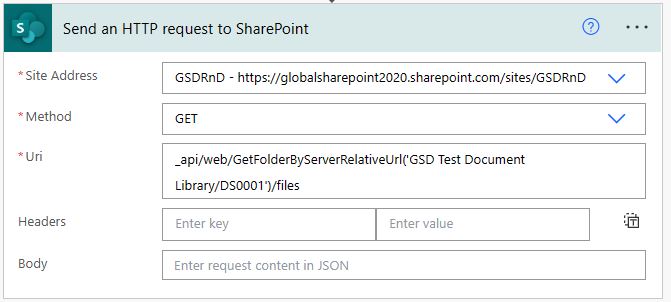
URI:
_api/web/GetFolderByServerRelativeUrl('Your document library name/your folder name')/files
Output returns by GETFolderByServerRelativeUrl request REST API
{

  "d": {

    "results": [

      {

        "__metadata": {

          "id": "(add https)globalsharepoint2020.sharepoint.com/sites/GSDRnD/_api/Web/GetFileByServerRelativePath(decodedurl='/sites/GSDRnD/GSD Test Document Library/DS0001/Sample File 2.csv')",

          "uri": "(add https)globalsharepoint2020.sharepoint.com/sites/GSDRnD/_api/Web/GetFileByServerRelativePath(decodedurl='/sites/GSDRnD/GSD%20Test%20Document%20Library/DS0001/Sample%20File%202.csv')",

          "type": "SP.File"

        },

        "Author": {

          "__deferred": {

            "uri": "(add https)globalsharepoint2020.sharepoint.com/sites/GSDRnD/_api/Web/GetFileByServerRelativePath(decodedurl='/sites/GSDRnD/GSD%20Test%20Document%20Library/DS0001/Sample%20File%202.csv')/Author"

          }

        },

        "CheckedOutByUser": {

          "__deferred": {

            "uri": "(add https)globalsharepoint2020.sharepoint.com/sites/GSDRnD/_api/Web/GetFileByServerRelativePath(decodedurl='/sites/GSDRnD/GSD%20Test%20Document%20Library/DS0001/Sample%20File%202.csv')/CheckedOutByUser"

          }

        },

        "EffectiveInformationRightsManagementSettings": {

          "__deferred": {

            "uri": "(add https)globalsharepoint2020.sharepoint.com/sites/GSDRnD/_api/Web/GetFileByServerRelativePath(decodedurl='/sites/GSDRnD/GSD%20Test%20Document%20Library/DS0001/Sample%20File%202.csv')/EffectiveInformationRightsManagementSettings"

          }

        },

        "InformationRightsManagementSettings": {

          "__deferred": {

            "uri": "(add https)globalsharepoint2020.sharepoint.com/sites/GSDRnD/_api/Web/GetFileByServerRelativePath(decodedurl='/sites/GSDRnD/GSD%20Test%20Document%20Library/DS0001/Sample%20File%202.csv')/InformationRightsManagementSettings"

          }

        },

        "ListItemAllFields": {

          "__deferred": {

            "uri": "(add https)globalsharepoint2020.sharepoint.com/sites/GSDRnD/_api/Web/GetFileByServerRelativePath(decodedurl='/sites/GSDRnD/GSD%20Test%20Document%20Library/DS0001/Sample%20File%202.csv')/ListItemAllFields"

          }

        },

        "LockedByUser": {

          "__deferred": {

            "uri": "(add https)globalsharepoint2020.sharepoint.com/sites/GSDRnD/_api/Web/GetFileByServerRelativePath(decodedurl='/sites/GSDRnD/GSD%20Test%20Document%20Library/DS0001/Sample%20File%202.csv')/LockedByUser"

          }

        },

        "ModifiedBy": {

          "__deferred": {

            "uri": "(add https)globalsharepoint2020.sharepoint.com/sites/GSDRnD/_api/Web/GetFileByServerRelativePath(decodedurl='/sites/GSDRnD/GSD%20Test%20Document%20Library/DS0001/Sample%20File%202.csv')/ModifiedBy"

          }

        },

        "Properties": {

          "__deferred": {

            "uri": "(add https)globalsharepoint2020.sharepoint.com/sites/GSDRnD/_api/Web/GetFileByServerRelativePath(decodedurl='/sites/GSDRnD/GSD%20Test%20Document%20Library/DS0001/Sample%20File%202.csv')/Properties"

          }

        },

        "VersionEvents": {

          "__deferred": {

            "uri": "(add https)globalsharepoint2020.sharepoint.com/sites/GSDRnD/_api/Web/GetFileByServerRelativePath(decodedurl='/sites/GSDRnD/GSD%20Test%20Document%20Library/DS0001/Sample%20File%202.csv')/VersionEvents"

          }

        },

        "Versions": {

          "__deferred": {

            "uri": "(add https)globalsharepoint2020.sharepoint.com/sites/GSDRnD/_api/Web/GetFileByServerRelativePath(decodedurl='/sites/GSDRnD/GSD%20Test%20Document%20Library/DS0001/Sample%20File%202.csv')/Versions"

          }

        },

        "CheckInComment": "",

        "CheckOutType": 2,

        "ContentTag": "{6CDC34BA-8E9A-4C01-9D6C-624FE0E64D39},4,1",

        "CustomizedPageStatus": 0,

        "ETag": "\"{6CDC34BA-8E9A-4C01-9D6C-624FE0E64D39},4\"",

        "Exists": true,

        "IrmEnabled": false,

        "Length": "380",

        "Level": 1,

        "LinkingUri": "(add https)globalsharepoint2020.sharepoint.com/sites/GSDRnD/GSD%20Test%20Document%20Library/DS0001/Sample%20File%202.csv?d=w6cdc34ba8e9a4c019d6c624fe0e64d39",

        "LinkingUrl": "(add https)globalsharepoint2020.sharepoint.com/sites/GSDRnD/GSD Test Document Library/DS0001/Sample File 2.csv?d=w6cdc34ba8e9a4c019d6c624fe0e64d39",

        "MajorVersion": 3,

        "MinorVersion": 0,

        "Name": "Sample File 2.csv",

        "ServerRelativeUrl": "/sites/GSDRnD/GSD Test Document Library/DS0001/Sample File 2.csv",

        "TimeCreated": "2022-12-10T14:46:58Z",

        "TimeLastModified": "2022-12-10T14:50:31Z",

        "Title": null,

        "UIVersion": 1536,

        "UIVersionLabel": "3.0",

        "UniqueId": "6cdc34ba-8e9a-4c01-9d6c-624fe0e64d39"

      },

      {

        "__metadata": {

          "id": "(add https)globalsharepoint2020.sharepoint.com/sites/GSDRnD/_api/Web/GetFileByServerRelativePath(decodedurl='/sites/GSDRnD/GSD Test Document Library/DS0001/Sample File 3.docx')",

          "uri": "(add https)globalsharepoint2020.sharepoint.com/sites/GSDRnD/_api/Web/GetFileByServerRelativePath(decodedurl='/sites/GSDRnD/GSD%20Test%20Document%20Library/DS0001/Sample%20File%203.docx')",

          "type": "SP.File"

        },

        "Author": {

          "__deferred": {

            "uri": "(add https)globalsharepoint2020.sharepoint.com/sites/GSDRnD/_api/Web/GetFileByServerRelativePath(decodedurl='/sites/GSDRnD/GSD%20Test%20Document%20Library/DS0001/Sample%20File%203.docx')/Author"

          }

        },

        "CheckedOutByUser": {

          "__deferred": {

            "uri": "(add https)globalsharepoint2020.sharepoint.com/sites/GSDRnD/_api/Web/GetFileByServerRelativePath(decodedurl='/sites/GSDRnD/GSD%20Test%20Document%20Library/DS0001/Sample%20File%203.docx')/CheckedOutByUser"

          }

        },

        "EffectiveInformationRightsManagementSettings": {

          "__deferred": {

            "uri": "(add https)globalsharepoint2020.sharepoint.com/sites/GSDRnD/_api/Web/GetFileByServerRelativePath(decodedurl='/sites/GSDRnD/GSD%20Test%20Document%20Library/DS0001/Sample%20File%203.docx')/EffectiveInformationRightsManagementSettings"

          }

        },

        "InformationRightsManagementSettings": {

          "__deferred": {

            "uri": "(add https)globalsharepoint2020.sharepoint.com/sites/GSDRnD/_api/Web/GetFileByServerRelativePath(decodedurl='/sites/GSDRnD/GSD%20Test%20Document%20Library/DS0001/Sample%20File%203.docx')/InformationRightsManagementSettings"

          }

        },

        "ListItemAllFields": {

          "__deferred": {

            "uri": "(add https)globalsharepoint2020.sharepoint.com/sites/GSDRnD/_api/Web/GetFileByServerRelativePath(decodedurl='/sites/GSDRnD/GSD%20Test%20Document%20Library/DS0001/Sample%20File%203.docx')/ListItemAllFields"

          }

        },

        "LockedByUser": {

          "__deferred": {

            "uri": "(add https)globalsharepoint2020.sharepoint.com/sites/GSDRnD/_api/Web/GetFileByServerRelativePath(decodedurl='/sites/GSDRnD/GSD%20Test%20Document%20Library/DS0001/Sample%20File%203.docx')/LockedByUser"

          }

        },

        "ModifiedBy": {

          "__deferred": {

            "uri": "(add https)globalsharepoint2020.sharepoint.com/sites/GSDRnD/_api/Web/GetFileByServerRelativePath(decodedurl='/sites/GSDRnD/GSD%20Test%20Document%20Library/DS0001/Sample%20File%203.docx')/ModifiedBy"

          }

        },

        "Properties": {

          "__deferred": {

            "uri": "(add https)globalsharepoint2020.sharepoint.com/sites/GSDRnD/_api/Web/GetFileByServerRelativePath(decodedurl='/sites/GSDRnD/GSD%20Test%20Document%20Library/DS0001/Sample%20File%203.docx')/Properties"

          }

        },

        "VersionEvents": {

          "__deferred": {

            "uri": "(add https)globalsharepoint2020.sharepoint.com/sites/GSDRnD/_api/Web/GetFileByServerRelativePath(decodedurl='/sites/GSDRnD/GSD%20Test%20Document%20Library/DS0001/Sample%20File%203.docx')/VersionEvents"

          }

        },

        "Versions": {

          "__deferred": {

            "uri": "(add https)globalsharepoint2020.sharepoint.com/sites/GSDRnD/_api/Web/GetFileByServerRelativePath(decodedurl='/sites/GSDRnD/GSD%20Test%20Document%20Library/DS0001/Sample%20File%203.docx')/Versions"

          }

        },

        "CheckInComment": "",

        "CheckOutType": 2,

        "ContentTag": "{E0CD7FBE-14A9-4471-A217-BB6D7E96D06C},7,10",

        "CustomizedPageStatus": 0,

        "ETag": "\"{E0CD7FBE-14A9-4471-A217-BB6D7E96D06C},7\"",

        "Exists": true,

        "IrmEnabled": false,

        "Length": "17413",

        "Level": 1,

        "LinkingUri": "(add https)globalsharepoint2020.sharepoint.com/sites/GSDRnD/GSD%20Test%20Document%20Library/DS0001/Sample%20File%203.docx?d=we0cd7fbe14a94471a217bb6d7e96d06c",

        "LinkingUrl": "(add https)globalsharepoint2020.sharepoint.com/sites/GSDRnD/GSD Test Document Library/DS0001/Sample File 3.docx?d=we0cd7fbe14a94471a217bb6d7e96d06c",

        "MajorVersion": 4,

        "MinorVersion": 0,

        "Name": "Sample File 3.docx",

        "ServerRelativeUrl": "/sites/GSDRnD/GSD Test Document Library/DS0001/Sample File 3.docx",

        "TimeCreated": "2022-12-10T14:46:41Z",

        "TimeLastModified": "2022-12-24T17:23:02Z",

        "Title": "",

        "UIVersion": 2048,

        "UIVersionLabel": "4.0",

        "UniqueId": "e0cd7fbe-14a9-4471-a217-bb6d7e96d06c"

      },

      {

        "__metadata": {

          "id": "(add https)globalsharepoint2020.sharepoint.com/sites/GSDRnD/_api/Web/GetFileByServerRelativePath(decodedurl='/sites/GSDRnD/GSD Test Document Library/DS0001/Sample File 1.csv')",

          "uri": "(add https)globalsharepoint2020.sharepoint.com/sites/GSDRnD/_api/Web/GetFileByServerRelativePath(decodedurl='/sites/GSDRnD/GSD%20Test%20Document%20Library/DS0001/Sample%20File%201.csv')",

          "type": "SP.File"

        },

        "Author": {

          "__deferred": {

            "uri": "(add https)globalsharepoint2020.sharepoint.com/sites/GSDRnD/_api/Web/GetFileByServerRelativePath(decodedurl='/sites/GSDRnD/GSD%20Test%20Document%20Library/DS0001/Sample%20File%201.csv')/Author"

          }

        },

        "CheckedOutByUser": {

          "__deferred": {

            "uri": "(add https)globalsharepoint2020.sharepoint.com/sites/GSDRnD/_api/Web/GetFileByServerRelativePath(decodedurl='/sites/GSDRnD/GSD%20Test%20Document%20Library/DS0001/Sample%20File%201.csv')/CheckedOutByUser"

          }

        },

        "EffectiveInformationRightsManagementSettings": {

          "__deferred": {

            "uri": "(add https)globalsharepoint2020.sharepoint.com/sites/GSDRnD/_api/Web/GetFileByServerRelativePath(decodedurl='/sites/GSDRnD/GSD%20Test%20Document%20Library/DS0001/Sample%20File%201.csv')/EffectiveInformationRightsManagementSettings"

          }

        },

        "InformationRightsManagementSettings": {

          "__deferred": {

            "uri": "(add https)globalsharepoint2020.sharepoint.com/sites/GSDRnD/_api/Web/GetFileByServerRelativePath(decodedurl='/sites/GSDRnD/GSD%20Test%20Document%20Library/DS0001/Sample%20File%201.csv')/InformationRightsManagementSettings"

          }

        },

        "ListItemAllFields": {

          "__deferred": {

            "uri": "(add https)globalsharepoint2020.sharepoint.com/sites/GSDRnD/_api/Web/GetFileByServerRelativePath(decodedurl='/sites/GSDRnD/GSD%20Test%20Document%20Library/DS0001/Sample%20File%201.csv')/ListItemAllFields"

          }

        },

        "LockedByUser": {

          "__deferred": {

            "uri": "(add https)globalsharepoint2020.sharepoint.com/sites/GSDRnD/_api/Web/GetFileByServerRelativePath(decodedurl='/sites/GSDRnD/GSD%20Test%20Document%20Library/DS0001/Sample%20File%201.csv')/LockedByUser"

          }

        },

        "ModifiedBy": {

          "__deferred": {

            "uri": "(add https)globalsharepoint2020.sharepoint.com/sites/GSDRnD/_api/Web/GetFileByServerRelativePath(decodedurl='/sites/GSDRnD/GSD%20Test%20Document%20Library/DS0001/Sample%20File%201.csv')/ModifiedBy"

          }

        },

        "Properties": {

          "__deferred": {

            "uri": "(add https)globalsharepoint2020.sharepoint.com/sites/GSDRnD/_api/Web/GetFileByServerRelativePath(decodedurl='/sites/GSDRnD/GSD%20Test%20Document%20Library/DS0001/Sample%20File%201.csv')/Properties"

          }

        },

        "VersionEvents": {

          "__deferred": {

            "uri": "(add https)globalsharepoint2020.sharepoint.com/sites/GSDRnD/_api/Web/GetFileByServerRelativePath(decodedurl='/sites/GSDRnD/GSD%20Test%20Document%20Library/DS0001/Sample%20File%201.csv')/VersionEvents"

          }

        },

        "Versions": {

          "__deferred": {

            "uri": "(add https)globalsharepoint2020.sharepoint.com/sites/GSDRnD/_api/Web/GetFileByServerRelativePath(decodedurl='/sites/GSDRnD/GSD%20Test%20Document%20Library/DS0001/Sample%20File%201.csv')/Versions"

          }

        },

        "CheckInComment": "",

        "CheckOutType": 2,

        "ContentTag": "{10951643-66B8-4EE9-AB1C-D665D7AF0BF8},4,1",

        "CustomizedPageStatus": 0,

        "ETag": "\"{10951643-66B8-4EE9-AB1C-D665D7AF0BF8},4\"",

        "Exists": true,

        "IrmEnabled": false,

        "Length": "380",

        "Level": 1,

        "LinkingUri": "(add https)globalsharepoint2020.sharepoint.com/sites/GSDRnD/GSD%20Test%20Document%20Library/DS0001/Sample%20File%201.csv?d=w1095164366b84ee9ab1cd665d7af0bf8",

        "LinkingUrl": "(add https)globalsharepoint2020.sharepoint.com/sites/GSDRnD/GSD Test Document Library/DS0001/Sample File 1.csv?d=w1095164366b84ee9ab1cd665d7af0bf8",

        "MajorVersion": 3,

        "MinorVersion": 0,

        "Name": "Sample File 1.csv",

        "ServerRelativeUrl": "/sites/GSDRnD/GSD Test Document Library/DS0001/Sample File 1.csv",

        "TimeCreated": "2022-12-10T14:46:58Z",

        "TimeLastModified": "2022-12-10T14:49:35Z",

        "Title": null,

        "UIVersion": 1536,

        "UIVersionLabel": "3.0",

        "UniqueId": "10951643-66b8-4ee9-ab1c-d665d7af0bf8"

      }

    ]

  }

}
List of file properties or metadata returns by GETFolderByServerRelativeUrl request REST API
- CheckInComment
- CheckOutType
- ContentTag
- CustomizedPageStatus
- ETag
- Exists
- IrmEnabled
- Length
- Level
- LinkingUri
- LinkingUrl
- MajorVersion
- MinorVersion
- Name
- ServerRelativeUrl
- TimeCreated
- TimeLastModified
- Title
- UIVersion
- UIVersionLabel
- UniqueId
Advantages of REST API in Send an HTTP request to SharePoint with Power Automate
Below are the advantages of “Send an HTTP request to SharePoint:”
- This is faster than the above methods.
- We can include filter query string parameters.
- The custom metadata columns are not returned by the REST API request GETFolderByServerRelativeUrl.
Key take-away:
From the above 3 methods, only Get Items or Get files (properties only) retrieve files along with all custom metadata; the List Folder and GETFolderByServerRelativeUrl request REST API methods don’t bring the custom metadata columns.
Summary: Get all files in a folder Power Automate
Thus, in this article, we have learned the following with respect to how to get all files in a folder using Power Automate:
- Limit Entries to Folder in the Get Items query to get all files in a folder.
- How to use the list folder query to list all files in a folder.
- How to get all files in a folder using the “GETFolderByServerRelativeUrl” request REST API method
See Also: Power Automate Articles Hub (with real-time example)
- You may visit the Power Automate articles hub
- Take care of what’s important. Automate the rest
If you like our articles, please appreciate our efforts by liking and sharing them with your friends and colleagues. Please join the mailing list to get our articles in your inbox as and when we publish them.
Happy automating and learning!
About Post Author

Discover more from Global SharePoint
Subscribe to get the latest posts sent to your email.